
Everyone’s being talking about freelancing lately, especially after covid, when the whole world started remotely.
Freedom to work at your own time, getting paid higher than your usual jobs, everything that sounds like living a dream life. It is glorified so much that every 8 out of 10 people that you meet must have talked about leaving a job and started freelancing.
Afterall, who doesn’t want to work in mountains while sipping a cup of coffee, right?
Well, we are going to break down a reality of it! (Hint: it’s not bad, it’s good enough to make you feel resign right away)
And if you are just starting out or levelling up, this guide is going to help you thrive in today’s economy, from time management and productivity systems to the best tools, platforms, and strategies for finding clients and scaling.
Let’s start with what freelancing in 2026 really looks like.
Freelancing in 2026 – What’s Changing and What Still Works
Freelancing has come a long way since its early days on job boards. After 2020’s remote work boom, more professionals began freelancing by choice not necessity.
And with AI, things only got better for everyone. Platforms grew, AI tools emerged, and clients became global.
What’s New:
- Global Client Access: A graphic designer in Jaipur can work with a startup in Berlin overnight.
- AI-Powered Workflows: Proposal writing, editing, even client onboarding can be AI-assisted.
- Remote-Centric Culture: Most freelance work is now born remote, not adapted to it.
- Freelance Market Size: According to World Bank estimates, over 1.57 billion people worldwide freelance, making up nearly 47% of the global workforce.
What Still Works:
- Strong portfolios
- Consistent communication
- Delivering on time
- Managing expectations
Freelancers today are better seen as solo businesses, not side hustlers. The mindset shift from gig-seeker to business owner is setting high-performers apart.
Building a Solid Freelance Foundation
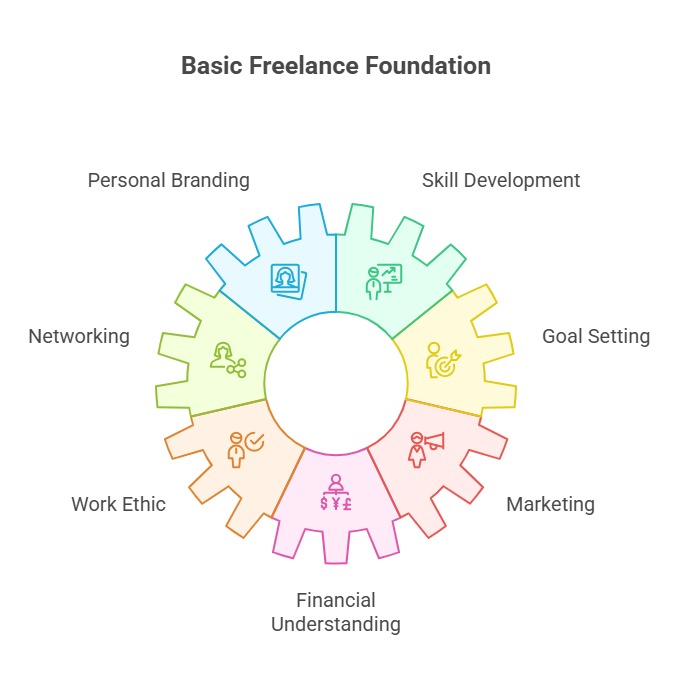
Essential Skills and Traits for Freelance Success
Freelancing isn’t a single skill; it’s a blend of many. Without these baseline competencies, you’ll struggle to deliver quality work, win clients, or get paid what you’re worth.
Self-discipline
There’s no clocking in. No manager checking your working hours. You need internal accountability to meet deadlines, follow up, and complete projects even on low-motivation days.
Client communication
This isn’t just about replying fast. Freelancers who win repeat clients often excel at proactive updates. A simple “Just a heads up, I’m 60% done and will share a draft by Friday” builds trust. Also, know when to push back tactfully.
Time estimation
Consistently underestimating how long a task takes is the fastest way to kill your margins. Learn to track how long tasks actually take so you can price accordingly. If you think something takes 2 hours but actually takes 5, you’re not just underpaid, you’re burnt out.
Negotiation
Freelancers negotiate scope, price, revisions, timelines, and even feedback terms. It’s not about being pushy, it’s about advocating for what’s fair. And fair often means profitable.
Resilience
Expect rejection. Lots of it. Some clients disappear mid-project. Others ghost after you send a proposal. The most successful freelancers aren’t immune, they’re just quick to bounce back, learn, and move forward.
Bonus Traits to Cultivate
- Attention to detail (saves revision time)
- Adaptability (especially with fast-moving industries like AI and design)
- Curiosity (helps you grow faster than your competitors)
- Self-marketing (your work won’t promote itself)
Choosing a Niche That Pays
Niche selection can make or break your freelance career. While it’s tempting to offer “everything,” focused freelancers earn more, land better clients, and build stronger reputations.
Use This 3-Point Filter to Choose Your Niche:
1. Demand
Are people actively hiring in this area?
You can validate this by checking platforms like Upwork, Fiverr, Contra, and job boards like We Work Remotely or RemoteOK. Filter by niche and see how many listings pop up.
2. Skill Alignment
Do you already have the skills?
If not, how quickly can you learn them? Some niches require certifications (e.g., Google Ads), while others (like copywriting) rely on portfolios.
3. Pricing Potential
Are people charging above $30/hour? Or are rates stuck at $5 gigs?
Look for niches where your time is valued.
Hint: solving business problems (like conversion optimization or lead generation) usually pays more than general tasks (like social media captions).
In-Demand Freelance Niches for 2026:
- Web Development: Full stack, frontend, backend, and no-code tools (e.g., Webflow)
- Content Writing & SEO: Blog writing, email copy, product descriptions
- UI/UX Design: Especially mobile-first and accessibility-focused projects
- Online Tutoring: Academic support, test prep, or language learning
- Virtual Assistance: Admin support, calendar management, CRM updates
- Email Marketing: Newsletters, drip campaigns, sales sequences
- Podcast Production: Editing, show notes, promotional content
- AI Prompt Engineering: Writing prompts for LLMs, chatbot refinement
Pro tip: Don’t just pick what’s hot, pick what you’re curious enough to keep learning for years.
Creating a Client-Ready Presence
Even if you’re a beginner, looking professional builds trust instantly. You don’t need a fancy agency website or 50 testimonials. Just a few solid signals that show you’re serious.
1. Portfolio Website
Set up a basic site with your name, services, and 3-4 sample projects. These can be actual client work, internships, or even fictional case studies to show your process.
Use platforms like:
- Notion (for no-code, quick portfolios)
- Framer or Carrd (for visually slick one-pagers)
- WordPress or Webflow (for deeper customization)
Make sure to include:
- Problem statement
- Your solution
- Tools used
- Results (if available)
- One clear CTA (e.g., “Contact Me”)
2. LinkedIn Optimization
Your headline should say what you do and who you do it for.
For example:
“Email Copywriter for SaaS Founders | 3x Open Rate Gains”
Other quick wins:
- Add a banner image showing your niche
- Use the “Featured” section to link your portfolio
- Post content 1-2x/week sharing tips or project insights
3. Upwork & Fiverr Profiles
These platforms are still useful, especially for beginners. But your profile needs to speak the platform’s SEO language.
- Add niche keywords like “SEO writer,” “webflow developer,” “Dubsado setup,” etc.
Use clear value-driven descriptions.
“I help small businesses convert more leads through strategic landing pages.”
Reviews and ratings matter, so overdeliver in early gigs to build momentum.
4. Professional Email Setup
Yes, Gmail is fine, but a custom domain looks better.
yourname@yourportfolio.com feels more serious than writergirl438@gmail.com.
You can buy a domain on Namecheap and connect email via Zoho or Google Workspace. It’s worth the ~$2-6/month investment.
Bonus: Personal Brand Tips
In 2026, clients will want humans, not faceless freelancers. Build trust faster by showing your personality (especially on platforms like LinkedIn and Twitter/X).
Try:
- Sharing lessons from your latest client project
- Posting mini case studies
- Talking about what you’re learning in your niche
- Creating a simple personal logo or color scheme to stay recognizable
Best Platforms to Start Freelancing
Which is the first freelancing platform that comes to your mind?
Upwork?
Fiver?
Well, just like you most freelancers start bidding on them and after a month or two, they come to a conclusion that this is not working.
You must have heard your friends or colleagues complaining about not getting gigs from these platforms.
Reason is these are highly competitive, and you need to find the right platform to get those gigs and keep the money coming.
Here are the platforms that you can use, with pros and cons of each to give you a better understanding for making a right choice.
Upwork
Upwork remains one of the largest freelancing platforms globally, used by businesses of all sizes from solo founders to Fortune 500 companies.
Pros:
- Massive client pool across almost every industry
- Project types include hourly, fixed price, and long-term retainers
- Built-in milestone protection and escrow payments provide security
Cons:
- Extremely competitive; new freelancers often struggle to stand out
- Platform fee is 10% on all earnings (down from 20% pre-2023 for most users)
- Requires time investment to build reviews and a Top-Rated profile
Best For:
Experienced freelancers or beginners willing to send custom proposals consistently and build a niche reputation.
Fiverr
Fiverr allows freelancers to sell fixed-price packages (“gigs”) that clients can purchase directly. It’s especially popular for visual design, writing, and video services.
Pros:
- Easy to get started with pre-set services
- Good for creatives (e.g., logos, voiceovers, thumbnails)
- Option to scale packages and offer upgrades
Cons:
- Heavy competition often leads to price wars
- New profiles can feel invisible without marketing
- Fiverr charges a 20% service fee on each transaction
Best For:
Creatives who can standardize services and want to build repeatable, high-volume offerings.
Toptal
Short for “Top Talent,” Toptal is an exclusive network for software developers, designers, finance experts, and project managers.
Pros:
- Access to premium clients (including Airbnb and Shopify)
- Projects tend to be long-term and well-paid
- Zero bidding. Clients come to you once accepted
Cons:
- The vetting process is strict: only ~3% of applicants get in
- Requires a strong portfolio and real-world experience
- Not suited for beginners or generalists
Best For:
Mid-level to senior professionals with proven expertise and client results.
Contra
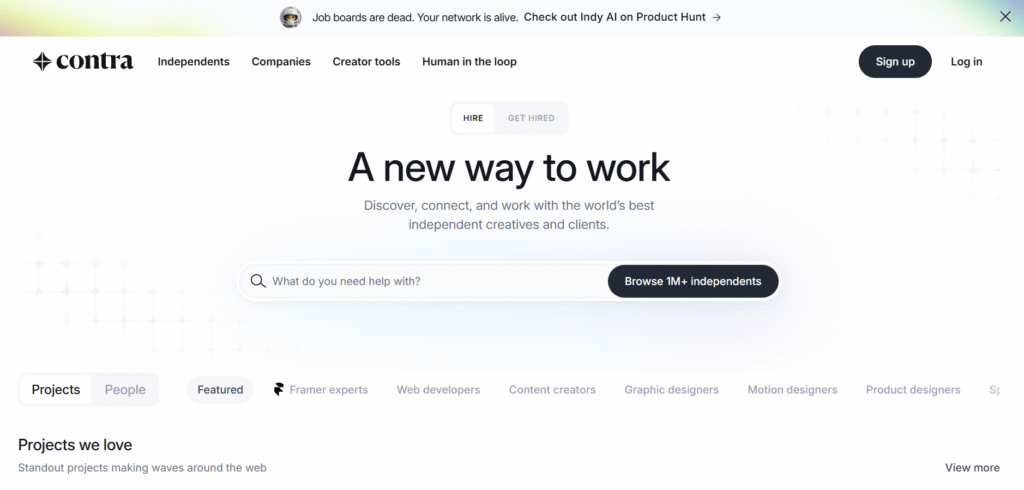
Contra markets itself as a commission-free platform designed for the new wave of independent creatives, especially Gen Z freelancers.
Pros:
- No platform fees for freelancers, keep 100% of what you earn
- Modern UX with portfolio-style profiles
- Direct contracts, no middlemen
Cons:
- Smaller client base compared to legacy platforms
- Fewer tech and dev jobs compared to Upwork or Toptal
- Still evolving features and ecosystem
Best For: Designers, marketers, and video creators looking for a cleaner, platform-free feel.
Others to Consider
- PeoplePerHour: UK-based marketplace popular in Europe. Features hourly and fixed-price gigs in tech, marketing, and admin support.
- We Work Remotely: Less of a marketplace and more of a curated job board for remote work. Ideal for developers, designers, and marketers.
- Freelancer.com: Similar to Upwork but less curated. Good for exploring international clients but comes with a learning curve.
Platform Tip:
Don’t try to be everywhere. Start by mastering one platform.
Understand its algorithm, build your profile, gather reviews, and only then consider expanding to others. A focused presence always beats a scattered one.
Now comes the real thing, something that most freelancers miss out. Most freelancers focus on getting clients, submitting work and getting paid.
Freelance Time Management & Productivity Systems
But if you have been freelancing for a while now, you must have noticed a pattern that you end up working after hours, usually more than what you used to in your 9 to 5.
So, is the freedom of time that comes with freelancing a lie?
No, not really! If you manage your time and build systems that actually work, you can wrap up your work in 9 to 5.
Here are some of the tips that will help you.
Time-Blocking and Calendar Planning
Organize your week using:
- Google Calendar: Schedule focus blocks, meetings, admin
- Motion: Auto-scheduling based on task priority
- Sunsama: Daily planning meets task-tracking
Create 3-4 deep work blocks a week for project execution.
Prioritization Using the Eisenhower Matrix
- Urgent & Important: Do now
- Important but Not Urgent: Schedule
- Urgent but Not Important: Delegate
- Neither: Delete
Use it weekly to balance client and internal goals.
Project Breakdown and SMART Goal Mapping
Turn briefs into:
- Specific milestones
- Measurable outcomes
- Achievable timelines
- Relevant deliverables
- Time-bound deadlines
Break projects into weekly sprints with clear outputs. Use templates for repeatable projects.
Task Batching and Distraction Management
Batch repetitive tasks:
- Emails
- Invoicing
- Social posting
Use tools to manage distractions:
- Freedom: Website blocker
- Cold Turkey: Schedule app blocking
- Pomofocus: Timed sprints for focused work
Use the 52/17 method: 52 minutes work, 17 minutes break.
Time-Tracking and Data-Driven Pricing
Track time to:
- Analyze hourly rate (time vs earnings)
- Justify rate increases
- Understand project profitability
Tools:
- Toggl
- Harvest
- Clockify
Tools and Automations to Streamline Freelance Work
Productivity & Project Management Apps
- Notion: Central hub for tasks, docs, calendars
- Trello: Visual boards for workflow management
- ClickUp: End-to-end management (tasks + docs + timelines)
- Linear: Great for developers and product teams
Example Workflow:
Client Brief → Planning Board → Task Assignment → Draft → Delivery Checklist
Client Communication & Boundaries
Create onboarding docs that explain:
- Your working hours
- Expected response times
- Project tools used
Tools:
- Calendly for call scheduling
- Loom for async updates
- Slack for client channels
- Email templates for onboarding and feedback
Email, Docs, and Proposal Systems
- Gmail filters: Prioritize client emails
- Google Drive: Store contracts and project files
- Notion Docs: Collaborative proposals
Proposal Tools:
- PandaDoc
- Better Proposals
- Bonsai (contract + invoice + proposal)
Automation & AI for Admin Tasks
Use automation for:
- Sending follow-ups after meetings
- Generating invoices
- Updating spreadsheets
- Auto-saving attachments
Tools:
- Zapier
- Make
- ChatGPT + Google Sheets
- TextExpander for canned responses
You will use all these tips for productivity and tools for automation but as your freelance career grows, client management becomes just as important as your technical skills.
Without clear boundaries, communication, and long-term planning, success can quickly lead to burnout or plateauing.
Setting Clear Expectations from the Start
Strong client relationships begin with clarity. Before you start working, define what’s included what’s not, and how the collaboration will function.
In your kick-off:
- Clarify the Scope: Describe exactly what’s being delivered (e.g., “3 email templates per week for 4 weeks” instead of “email marketing help”).
- Set Timelines: Create a calendar with major milestones and checkpoints.
- Define Deliverables: Format, word count, number of design revisions, asset types, etc.
- Set Communication Norms: When are you available? How quickly do you reply? Do you use Slack, Notion, or email?
- Use Contracts: Even simple service agreements can reduce misunderstandings. Clearly list revision rounds, fees, and late payment terms.
A well-defined onboarding process prevents 90% of client disputes and makes you appear more professional.
Saying No to Protect Focus and Energy
As work picks up, learning when and how to say no becomes critical. Not all clients or projects are aligned with your goals.
Say no to:
- Misaligned Values: Clients whose business ethics don’t match yours
- Scope Creep Without Pay: When tasks increase but budget stays the same
- Unrealistic Timelines: Projects that demand overnight delivery on complex tasks
How to decline professionally:
“Thank you for thinking of me. Based on the scope and timing, I’m not the right fit right now but I can refer someone great.”
Protecting your boundaries isn’t rude. It’s a business strategy.
Delegating & Outsourcing Non-Core Tasks
When you’re spending more time on admin than client work, it’s time to delegate. Outsourcing repetitive or time-consuming work allows you to focus on high-value tasks that grow your income.
Outsource:
- Admin Tasks: Inbox management, calendar scheduling
- Editing: Polish your first drafts or transcripts
- Research: For blog posts, SEO keywords, design references
- Social media: Scheduling posts, basic caption writing, performance tracking
Where to find reliable help:
- Fiverr Business: Curated freelancers for admin and content support
- OnlineJobs.ph: Affordable, long-term virtual assistants from the Philippines
- Workello: Screening and hiring platform for remote freelancers
- Assist-o-Matic: Directory for part-time virtual assistants
Tips for smooth delegation:
- Start with one task (like inbox triage)
- Use SOPs (standard operating procedures) to train
- Have weekly check-ins and performance reviews
Scaling with Retainers
Project work pays the bills, but retainers build stability. Retainers are ongoing contracts where clients reserve your time and services monthly.
Why retainers work:
- Predictable Income: You know what you’ll earn every month
- Deeper Client Relationships: Consistency builds trust and understanding
- Efficiency: Less time spent onboarding new clients or chasing payments
How to offer retainers:
- Package recurring work (e.g., “10 hours/month for content updates”)
- Offer priority access or lower rates for longer commitments
- Use contracts to define scope and review terms quarterly
Freelancers with even 2-3 strong retainer clients often double their annual earnings with half the stress.
Scaling isn’t about growing fast. It’s about growing with intention, delegation, and reliable systems.
Freelance Lifestyle, Burnout, and Long-Term Success
Freelancing gives you control over your time but without systems and self-care, it can also blur the boundaries between work and life. Here’s how to sustain success for the long haul.
Designing a Work-Life Rhythm
Your calendar should reflect:
- Focus Work Blocks: Dedicated time for deep, creative work
- Admin Time: Emails, invoicing, client communication
- Breaks: Short pauses to rest and recalibrate
- Time Off: Weekly breaks, personal days, full vacations
Routines to protect mental bandwidth:
- Morning Rituals: Stretch, journal, plan the day
- Mid-Week Reset: Use Wednesdays to review goals or unplug early
- Evening Shutdown: Close laptop, reflect on wins, prep next day
Helpful tools:
- Rise Calendar: Plan days based on energy patterns
- Flown: Virtual focus rooms for deep work sessions with accountability
Don’t aim for perfect balance, aim for awareness of your rhythms and responsibilities.
Health Habits for Sustainable Energy
Sustaining a freelance career is impossible without taking care of your body and brain.
Simple, daily shifts:
- Move Every Hour: Walk, stretch, or switch posture
- Screen-Free Winddowns: No screens 1 hour before sleep
- Hydration: Keep a bottle nearby and refill 3-4 times/day
Supportive gear and tools:
- Stretchly or Wellness Coach: Reminders for breaks, breathwork, mindfulness
- Blue Light Glasses: Reduce eye strain for late-night work
- Ergonomic Workspace: Invest in a chair, desk, or laptop riser
- Standing Desk or Balance Chair: Alternate postures to stay active
Small shifts lead to big impact on long-term productivity and clarity.
Avoiding Isolation and Burnout
Freelancers often work alone and that silence can spiral into disconnection. Stay plugged into a community that gets it.
Ways to stay connected:
- Online Communities: Freelance Founders, Superpath, IndieHackers
- Virtual Coworking: Focusmate or Flown for structured, co-working blocks
- Local Meetups: Search Meetup or Eventbrite for creator circles
- Accountability Buddies: Weekly check-ins with a peer to share goals
Early signs of burnout:
- Missed deadlines
- Resentment toward clients or projects
- Emotional exhaustion or fog
- Avoiding work, you once enjoyed
According to Millo.co, 74% of freelancers report occasional burnout but those who regularly engage with peers and support systems experience it far less often.
Building habits around connection is just as important as productivity tools or pricing strategies.
Final Thoughts and Next Steps
If you are planning to start or if you have already started, don’t go for money or the freedom of time. The truth is you will most probably spend more time working than your 9 to 5.
But freelancing gives you an opportunity to get exposure with clients from different countries and helps you become a truly global talent.
Use the systems, tools and habits but don’t forget to choose clients that help you grow.




