
Project management is something we practice more often than we realize.
Think about planning a family trip, organizing a wedding, or even managing a home renovation. Everything requires setting a goal, managing time, working with people and adapting to things when they don’t go as planned.
And in the workplace, the same principles apply, but on the bigger scale. It helps teams stay organized, meet deadlines and deliver results on time.
To put is simply, it is an art of turning your ideas into reality in a more structured and reliable way.
And in this guide, we are going to discuss exactly what project management is.
From this guide, you will learn:
- What is Project Management?
- Why Project Management Matters
- Benefits of Project Management
- Core Principles of Project Management
- Popular Methodologies and Frameworks
- How to Choose the Right Methodology
- Project Management Lifecycle & Phases
- Top Project Management Tool
- Emerging Technologies in Project Management
- Project Management in Different Industries
This is going to be a very detailed guide and will teach you everything you need to learn about project management.
Let’s start it with the basics, what is project management. You probably know this, but this might give you a different perspective, so continue reading through the whole guide.
What is Project Management, its importance and benefits.
What is Project Management?
Project management is the process of turning an idea into reality in an organized way.
Basically, it’s just planning, coordinating and guiding work so that you can meet your desired goals within your budget.
Think of it like breaking down a big vision into smaller and manageable steps.
It includes deciding what needs to be done, who should do it and how long will it take. Once you have these things ready, project managers make sure that the team stays on track to keep everything moving smoothly.
A simple example is planning a trip. First you decide where you want to go, then you decide how to get there and list out what things to be packed. And ohh, don’t forget your friends.
You can compare it with project management like
- Place to go → goal
- How to get there → strategy
- What to pack → resources
- Friends → the team
You need to get everything right, before starting a trip or a project. So, your objectives are clear, and everyone knows their responsibilities. Your friend might forget to bring few things on the way, but it is your job to overcome that challenge and make sure that your team stays on track without any delays.
If it’s not clear yet, why project management matters, here is some more detail about it.
Why Project Management Matters?
Projects fail more often than people realize, just like how your trip to Goa or Miami, is reschedules more times than you expected.
Research shows that almost one in three never reach their original goals.
And if you are wondering that’s because of low budget and small teams, you are wrong.
Even big companies like Google also fail with huge budgets and top talent.
Take Google Glass. It had all the hype in the world, but expectations and real-world delivery didn’t match up. Or Microsoft’s Windows Phone, which lost direction and missed key timelines.
These examples remind us of that money and smart people alone can’t guarantee success.
That’s where project management makes the difference.
Without project management, even small tasks can quickly spiral.
With it, every task connects back to the bigger goal, risks are spotted early, and progress feels steady.
Now the question is, is it just about getting things done. Well, the answer is YES and NO.
But there are more benefits for organizations.
Benefits of Project Management
- Efficiency: It helps you manage resources and use them where they are required the most without wasting time and money..
- Predictability: it takes the guesswork out of the picture with clear deadlines and budgets..
- Collaboration: When your team has a clear framework, they are most likely to stay on the same page..
- Quality Control: With clear quality standards and SOPs, project management helps you ensure quality throughout the project cycle..
- Scalability: Even the biggest projects feel manageable once we break them into smaller, doable steps.
Core Principles, Methodologies, and Frameworks
Core Principles of Project Management
Goal Setting
Setting goal is very important and every successful project starts with a well defined goal. Imagine getting on a flight, not knowing where you would land. Thats exactly why goal setting is important.
Goals give direction, purpose, and a way to measure progress. And setting goal doesn’t mean, building a website in 4 weeks. It needs to have clear plan.
For example, saying “launch a website by June with five core features” is far clearer and more motivating than just saying “build a website soon.”
Stakeholder Engagement
Multiple entities are involved in every project like your client, team, managers and the end users.
So, it is important to involve everyone and set the right expectations from the beginning.
It helps avoid surprises in the later stage of your project.
Communication
Good communication is the backbone of any project.
Without it, tasks get lost, your team stays confused and frustrated.
So, regular updates, open conversations and clear instructions help keep everyone aligned and moving forward.
Even something simple like a weekly check-in can save months of rework.
Accountability
Projects succeed when people take ownership of their roles.
Accountability makes sure everyone knows what’s expected of them and commits to delivering.
When responsibilities are clear, deadlines are easier to meet and trust naturally builds.
Adaptability
No project ever goes exactly as planned.
Budgets and requirements change and roadblocks always pop-up.
So, adaptability helps you adjust to those changing without losing sight of the end goals.
Teams that embrace adaptability are more likely to succeed than those who don’t.
These were the principles of project management, but there are some methodologies and frameworks that have been tested over the years by the professionals and proven to work in real world environments.
Popular Methodologies and Frameworks
Waterfall
Waterfall is a step-by-step process. So, you finish one phase completely before moving on to the next one. It’s good for projects with fixed requirements.
Example: Building a house
Agile
Agile is more about flexibility and adaptability. In this methodology, work is broken into short cycles called sprints. What happens, is teams plan, build and review everything quickly within a specified time period.
Example: Software development projects where things change very often.
Scrum
Scrum is a type of Agile method. It gives teams clear roles like scrum master and product owner. In this methodologies, teams uses regular check-ins like daily check-ins and sprint reviews. It helps team stay organized and work together.
Kanban
Kanban uses a board to show work in progress. Just like Trello, where tasks move through columns like to do, in progress and done. It makes it very easy to visualize everything for the teams.
Lean Project Management
Lean methodology focused on doing only what adds value and cutting out on everything else. It helps team focus on high impact work that actually delivers outcomes.
Hybrid Approaches
Hybrid mixes methods like Agile and Waterfall. It gives you structure when you need it but also flexibility when things change.
How to Choose the Right Methodology for your Project?
There isn’t one perfect method for every project. The right choice depends on what you’re trying to achieve, the type of work you’re doing, and how much flexibility you’ll need along the way.
- Agile works best when you know that things are likely to change. Since the work is broken into short steps and regular feedbacks, its easier for teams to make adjustments accordingly.
- Waterfall is a better fit when everything is clear from the start and changes aren’t expected. It includes a step by step process like setting up a pillar for the house, then building walls and finally tiling.
- Kanban is great for teams that want a clear picture of their workload. Teams can visualize to do, in progress and done tasks, so everyone has clarity on what is pending and what needs attention. It is very useful for marketing, and support teams.
- Hybrid approaches combine the flexibility of Agile with the structure of Waterfall. This is often used in larger or more complex projects where teams need room to innovate but also have to stick to budgets or meet compliance requirements.
| Scenario | Best Fit Methodology | Why It Works |
| Building a new software product | Agile or Scrum | Supports quick iterations and user feedback. |
| Large construction project | Waterfall | Sequential steps and fixed requirements work best. |
| Marketing campaign with continuous tasks | Kanban | Visual tracking and flexibility for ongoing tasks. |
| Enterprise digital transformation | Hybrid (Agile + Waterfall) | Balances innovation with structure and compliance. |
| Customer support operations | Kanban | Handles continuous task inflow and prioritization. |
| Healthcare system implementation | Waterfall or Hybrid | Requires compliance and predictable outcomes. |
| Startup product launch | Agile | Rapid adaptation to market feedback. |
Well, these was all theory, now lets understand it with a practical example. We’ll see what project management lifecycle and phases look like.
Project Management Lifecycle & Phases
Every project has a journey, from an idea to a finished result. This journey is called the project lifecycle.
Its like a roadmap that guides teams. Following these helps team reduce confusion and increase the chances of success.
To make this easier to understand, let’s imagine a startup planning to launch a new fitness tracking mobile app. We’ll follow this project through each lifecycle phase.
Different Phases of Project Management
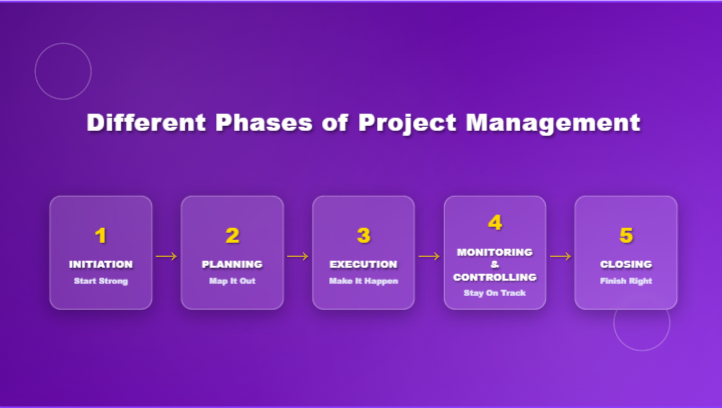
Initiation
This phase decides whether the project is worth pursuing. The team asks key questions:
- Is there a real market need for this app?
- Who are the target users?
- Do we have enough resources and budget?
Here, creating a Minimum Viable Product (MVP) is often suggested. For the app, an MVP could be a basic version that tracks workouts without advanced features. The MVP helps test feasibility before committing to full development.
Planning
If the project gets approved, planning begins. This is where the roadmap is built. The team sets timelines, budgets, resources, and responsibilities.
For the app, planning would include:
- Timeline for MVP release (say, within three months).
- Budget allocation for design, development, and testing.
- Assigning roles such as UI/UX designer, developer, and marketing lead.
Helpful questions at this stage:
- What are the critical milestones?
- How will success be measured?
- What risks should we prepare for?
Execution
This is where work officially starts. The team develops, tests, and integrates features based on the plan.
For the app project, this means:
- Designers building wireframes and prototypes.
- Developers coding workout tracking and user login.
- Marketing preparing pre-launch campaigns.
Progress is monitored constantly, and issues are raised quickly. Execution is where collaboration and accountability matter most.
Monitoring & Controlling
No plan works perfectly. This phase ensures the project stays on track. The team compares progress with the original plan and makes adjustments when needed.
For the fitness app, questions here might be:
- Are we meeting the development timeline?
- Is the project still within budget?
- Are early test users satisfied with the MVP?
Corrective actions are taken immediately. If a feature takes longer than expected, the timeline is adjusted or resources are reallocated.
Closing
Once the project is complete, it enters the closing phase. The app is launched to the public. The team reviews the outcomes and documents lessons learned.
For example:
- Did the app meet user expectations?
- Was the project delivered within time and budget?
- What should the team improve in future launches?
Closing is not just about finishing; it’s about reflection. A proper closing ensures that the knowledge gained is carried into future projects.
Top Project Management Tools & Emerging Technologies
WhitePanther
WhitePanther is an all-in-one project management dashboard built to eliminate the constant app-switching that slows teams down. Unlike fragmented systems, WhitePanther keeps email, tasks, meetings, time tracking, and cloud storage in one unified workspace. The standout feature is its smooth experience, there are no reloads and no switching tabs, which keeps workflows uninterrupted.
Key Features of WhitePanther:
- Unified dashboard for tasks, email, meetings, time tracking, and storage.
- AI-powered email drafting and prioritization.
- Calendar and scheduling integrated with tasks and deadlines.
- Cloud storage with Google Drive and Dropbox sync.
- Screen recording and communication modules built into the platform.
- In-app uploads, downloads, and real-time syncing.
- Multi-client communication management for freelancers and agencies.
- Payment management features for business users.
- Lightweight design with zero reloads for faster performance.
Key Highlight: Single pricing for multiple users, so you don’t have to pay for every single user. WhitePanther plans let you add multiple members without breaking your bank
Asana
Asana focuses on simplifying task management and workflow tracking. It uses lists, boards, and timelines to give teams a clear view of project progress. It is widely adopted because of its clean design and ease of use.
Key Features:
- Task lists and subtasks with due dates.
- Timeline view for scheduling projects.
- Project templates for faster setup.
- Team dashboards for progress tracking.
- Integrations with Slack, Google Drive, and Outlook.
Trello
Trello is a visual-first project management tool built around Kanban boards. Teams create cards for tasks and move them through different stages, making it easy to see what is pending, in progress, or completed.
Key Features:
- Drag-and-drop Kanban boards.
- Customizable workflows and task labels.
- Task automation through Trello Butler.
- Collaboration with comments and attachments on cards.
- Integration with apps like Dropbox, Slack, and Google Drive.
Jira
Jira is designed primarily for software development teams that follow Agile or Scrum frameworks. It provides powerful tools for sprint planning, bug tracking, and reporting.
Key Features:
- Agile boards for Scrum and Kanban.
- Backlog prioritization for development tasks.
- Sprint planning and tracking.
- Advanced reporting and analytics.
- Integration with developer tools like GitHub and Bitbucket.
Slack
Slack is primarily a communication tool but has become a central hub for many project teams. It uses channels, direct messaging, and integrations to connect people and platforms.
Key Features:
- Organized channels for different teams or topics.
- File sharing and quick search options.
- Voice and video calls.
- Powerful integrations with project tools like Asana and Jira.
- Custom workflow automations.
Microsoft Teams
Microsoft Teams extends beyond chat by combining video meetings, file storage, and integration with Microsoft 365 tools. It is widely used in organizations already within the Microsoft ecosystem.
Key Features:
- Team and channel-based communication.
- Integrated video conferencing.
- Real-time file collaboration with Office apps.
- Task and project integration with Planner.
- Secure document sharing and storage.
Google Workspace
Google Workspace provides a suite of cloud-based tools that support real-time collaboration. Teams use Docs, Sheets, and Drive to share and work together seamlessly.
Key Features:
- Real-time document editing with Google Docs and Sheets.
- Cloud storage with Google Drive.
- Shared calendars for scheduling.
- Gmail integration for communication.
- Built-in video conferencing with Google Meet.
Power BI and Tableau
Both Power BI and Tableau are leading analytics platforms that support project managers with data visualization and reporting. They help turn raw data into clear, actionable insights.
Key Features (Power BI and Tableau):
- Interactive dashboards and visualizations.
- Data integration from multiple sources.
- Real-time reporting.
- Custom KPI tracking.
- Export options for stakeholders and presentations.
AI in Project Management
These are the tools that businesses and individuals can use in project management. So, you might be wondering why we haven’t talked about AI in project management yet. Well, we kept the good stuff for the end. Here are some of the use cases of AI in project management.
AI-Driven Scheduling
Tools powered by AI can automatically build project schedules by analyzing workloads, deadlines, and resource availability. For example, instead of a manager manually assigning tasks, the tool suggests the best timeline based on team capacity.
Predictive Analytics for Risk Management
AI scans past project data to predict where risks may appear. It can flag if a project is likely to exceed budget, face delays, or miss milestones. This gives managers time to take corrective action before issues spiral.
Automated Reporting
Instead of spending hours compiling status reports, AI tools generate real-time dashboards. Stakeholders see progress instantly, with insights on performance, bottlenecks, and task completion rates.
Smart Resource Allocation
AI can recommend the best use of resources by analyzing who has bandwidth, which skills are required, and where delays may occur. This helps avoid overallocation or idle time.
AI-Powered Task Prioritization
Instead of teams debating what comes first, AI ranks tasks based on urgency, dependencies, and impact. For example, in software development, it can highlight bugs that affect core functionality before minor issues.
Chatbots for Project Queries
Teams can ask AI-driven bots questions like “What’s the status of Task A?” or “Who is assigned to the new feature?” and get instant answers without digging through spreadsheets.
Forecasting Project Success
By analyzing current progress, team performance, and external factors, AI tools can predict the likelihood of a project meeting deadlines. Managers gain a clearer picture of what to expect and how to adjust.
Project Management in different industries: How they are using it?
IT & Software Development
In tech, teams use it to roll out apps, update systems, and ship new features while keeping up with fast-changing requirements and user feedback.
Construction & Engineering
For big builds like bridges, offices, or highways, it helps keep budgets, designs, and safety standards in check while coordinating all the moving parts between architects, engineers, and contractors.
Marketing Campaigns
Marketing teams rely on it to juggle multiple campaigns, making sure product launches, seasonal promos, and creative assets are ready on time and nothing slips through the cracks.
Government & Nonprofits
With limited budgets and high accountability, it helps these organizations track resources carefully and prove the impact of programs, from local community projects to large social campaigns.
Education
Schools and universities use it to plan things like new buildings or online programs, making sure rollouts go smoothly and everyone from teachers to students benefits.
Finance & Banking
Banks lean on it when launching mobile apps, upgrading security, or creating new services, balancing the need to innovate with strict compliance rules.
E-commerce & Retail
Retailers depend on it to keep product updates, seasonal campaigns, and customer experiences consistent, even during the chaos of peak shopping seasons.
SaaS & Cloud Services
For SaaS companies, it keeps constant projects like feature updates, onboarding, and security fixes running smoothly so customers get improvements quickly without losing reliability.
Conclusion
Project management isn’t just a theory you read in books, it’s a skill that shapes how work gets done in every industry. From setting clear goals to managing risks and keeping teams aligned, it gives structure to ideas so they can actually turn into results.
What makes it exciting today is how quickly it’s evolving. With AI stepping in, project managers now have tools that can predict risks, automate reporting, and even suggest the best use of resources.
Instead of drowning in spreadsheets or missing deadlines, teams can focus on the work that really matters while AI handles the heavy lifting in the background.
Whether you’re planning a small campaign, building software, or leading a massive transformation, the principles stay the same: clarity, accountability, and adaptability.
With the right methods, tools, and a little help from AI, project management becomes more than just keeping things on track, it becomes the difference between struggling to finish and truly succeeding.

SEO Content Marketer
I help IT, SaaS, and tech brands turn complex ideas into clear, conversion-focused content—blogs, landing pages, and campaigns that educate buyers, build trust, and drive qualified leads. I blend sharp storytelling with SEO and marketing strategy so every piece earns its place in the funnel.



