
You lead a team that moves fast. You carry products, customers, and cash in your head at the same time.
Team collaboration is the difference between steady shipping and constant scramble.
In this guide, you will learn a simple way to align people, make decisions faster, and create space for deep work without burning everyone out.
You will leave with a plan you can start today. You will also get a thirty-day roadmap, and clear signals to the track.
Let’s start with how team collaboration has changed over the past few years.
How Team Collaboration Is Different Than It Used To Be
Meetings
You no longer gather in one office with shared hours and the same set of apps. Your team likely spans time zones, functions, and work styles. Meetings now stretch into the evening, and more sessions include people in different regions.
Microsoft reports Meetings after eight at night rose by double digits year over year, and about thirty percent of meetings now span multiple time zones. That trend has climbed since twenty twenty one.
Attention
The second shift is attention. Context switches to eat your day. Research by Gloria Mark shows the average time spent on one screen task is about forty-seven seconds before attention shifts. That is a warning that you need clear norms and fewer pings.
Meeting load
The third shift is meeting load. Asana found That knowledge workers lost a couple of hours each week in meetings they considered unnecessary. This is why the agenda of discipline and written updates matter.
Multiple tool hopping
The last shift is a tool sprawl. Most teams collect apps faster than they retire from them. That spreads work across tabs and slow search. A unified workspace that keeps tasks, mail, docs, meetings, and time tracking in one dashboard reduces reloads and tab hopping, so people stay in flow.
Where Modern Teams Get Stuck And How To Fix It
Pattern 1: Decisions Drift And Resurface
Indicators: The same topic returns week after week.
Drivers: Ownership is unclear, and no decision record exists.
Action plan:
- Assign a single decision of the owner.
- Create a decision log entry that captures context, options, the final call, and a review date.
- Link the entry in your meeting recap and reference it in future discussions.
Pattern 2: Meetings Without Outcomes
Indicators: People leave unsure about ownership and the next steps.
Drivers: No agenda, no time box, and no recap.
Action plan:
- Use a short agenda that states the goal and topics with timing.
- Close with three lines only decisions, owners, deadlines.
- Post a concise recap within one day and store it in a shared space.
Pattern 3: Too Many Apps And Tabs
Indicators: Files are scattered, and tasks slip through gaps.
Drivers: Tool sprawl and weak conventions.
Action plan:
- Reduce a small stack with one source of truth for tasks, one for docs, and one for chat.
- Prefer a single dashboard that loads once and keeps everything in view.
- Publish simple rules for where work lives and how to name items.
Pattern 4: Remote Friction
Indicators: Work stalls while teams wait for live replies.
Drivers: Processes depend on synchronous conversation.
Action plan:
- Default to async updates for status and decisions.
- Reserve live time for debate, alignment, and trust building.
- Add a daily overlap window and a handoff checklist that includes status, blockers, and next steps.
Pattern 5: Silence In Reviews
Indicators: A few voices dominate and issues surface late.
Drivers: Low psychological safety and limited inclusion.
Action plan:
- Start with written input and invite quieter voices first.
- Recognize thoughtful dissent and small experiments.
- Normalize quick reversals when new evidence appears and make learning visible to the team.
What Team Collaboration Is And Why It Matters
Team collaboration is the repeatable way your people plan, decide, build, and learn together. It is not just meetings or chatting. It is the system that moves work from idea to ship results with shared ownership and clear feedback.
The Core Principles of Team Collaboration
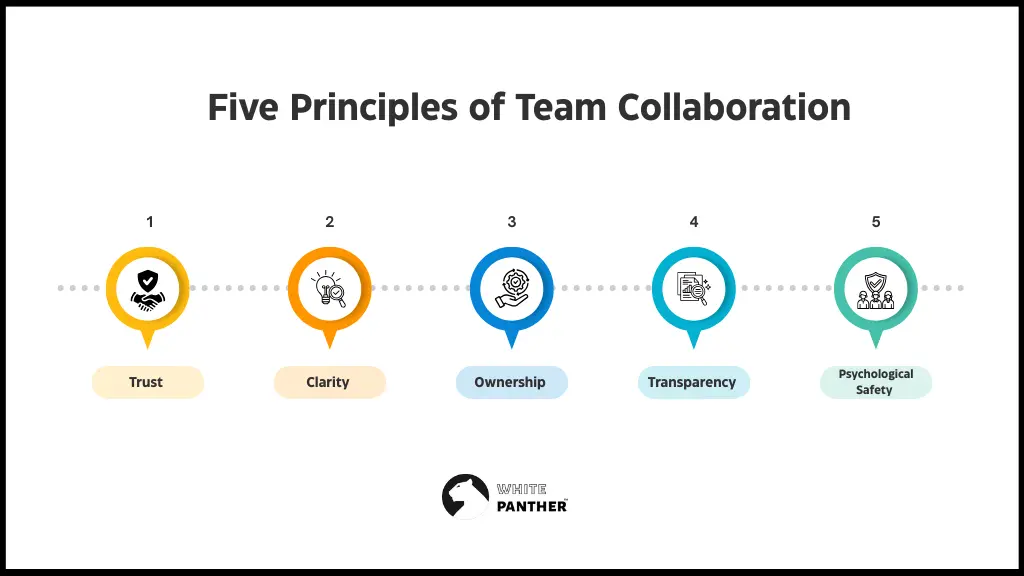
These five principles keep your system simple and strong.
Trust
- Keep promises small and visible.
- Share context early.
- Admit misses fast and repair.
Clarity
- State the goal in one sentence.
- Name the single owner and the due date.
- Define how you will measure success.
Ownership
- One accountable owner per decision or deliverable.
- Contributors are real and named.
- Owners publish recaps and next steps.
Transparency
- Open by default. Private, by exception.
- Publish decisions and recaps in a shared place.
- Let people follow the work without asking for access.
Psychological Safety
- Invite challenges without punishment.
- Rotate who speaks first.
- Ask what we learned rather than who is to blame. Evidence from Project Aristotle supports this practice.
Why does team collaboration matter?
- You ship faster when decisions are visible, and owners are clear.
- You raise quality when people can question assumptions without fear.
- You retain talent when the day feels focused and fair.
- You reduce rework when handoffs and documentation are simple and consistent.
Benefits of better Team Collaboration With Real World Outcomes
Faster delivery
Better communication and collaboration can lift productivity for interaction workers by about twenty to twenty-five percent. McKinsey found this gain in a broad study of social and collaborative tech.
Higher quality
When reviews are safe and decisions are written, defects fall and reopens drop. This aligns with findings on psychological safety and team effectiveness.
Better morale and retention
Gallup shows that highly engaged teams link to stronger business outcomes, including around twenty three percent higher profitability in the top quartile. Collaboration is not the only driver, but it is a major lever you control.
Fewer late nights
With clear async norms and better handoffs, you reduce the need for evening meetings. The rise in after-hour collaboration is real, so your norms must counter it.
Less time lost in meetings
Agenda discipline and written updates can reclaim the hours that workers report losing to low value meetings.
Frameworks You Can Use Right Away
You do not need heavy processing. You need a shared language.
DACI In Plain Words
- The driver keeps momentum and shepherds the work.
- The approvers made the final call.
- Contributors provide input and data.
- Informed people stay in the loop.
Use DACI for complex or cross functional projects with real risk.
RACI When Roles Blur
- Responsible are the doers.
- Accountable is the single owner.
- Consulted give input before the work.
- Informed get updates after decisions.
Use RACI when work spans teams or vendors and handoffs matter.
OKR For Focus
- Objectives are qualitative aims.
- Key Results are the measurable outcomes.
- Initiatives are the planned efforts.
Use OKR to align teams each quarter. Keep three to five results max.
Communication Norms That Reduce Friction in Team Collaboration
You win when communication is predictable and light.
Async And Sync Choices
- Use async for status, decisions, handoffs, and documentation.
- Use sync for debate, alignment, creativity, and trust building.
- Write the decision after every live conversation and share the link.
Meeting Hygiene
- Decide if a meeting is needed. If two people can decide on writing, skip it.
- Send a short agenda with the goal and topics with a time box.
- End with three lines of decisions, owners, and deadlines.
- Cancel any recurring session that produces no decisions two weeks in a row.
Documentation Habits
- Every project gets a living brief that states purpose, scope, team, timeline, and links.
- Every decision gets a log entry.
- Every meeting gets a recap in the same space.
Channels That Work
- Chat for quick questions and nudges.
- Docs for specs and decisions.
- Tasks for owners and dates.
- Video for complex discussion and relationship building.
Remote And Hybrid Tactics for Team Collaboration
Design time zones and attention limits. Protect focus like a scarce resource.
Time Zones And Handoffs
- Post a shared working hours map for the team.
- Set a daily overlap window for handoffs.
- Use handoff checklists that include status, blockers, and next steps.
- Record short loom style walkthroughs for complex updates so people can watch on their schedule.
Deep Work Protection
- Block two focus windows per day with notifications off.
- Batch chat checks at set times.
- Keep standups async three days a week and live two days a week.
- Use status messages that show focus time, so others know when to expect replies. The forty seven second attention tactic is a reminder to defend these blocks.
Related: How integrated tools can improve collaboration across remote teams?
Choosing And Using Collaboration Tools
You do not need more apps. You need a clean system you will actually use.
- One source of truth for tasks with owners and dates.
- A doc space with comments and a version of history.
- Chat that supports threads, mentions, and quiet hours.
- Calendar that handles time zones well.
- Lightweight video that records and transcribes.
- A unified dashboard that keeps email, tasks, meetings, notes, and time tracking in one place with no reloads and no tab switching.
Learn more about how to choose the right team collaboration software here.
A Lightweight Evaluation Checklist for choosing the right collaboration tool
- List the top five jobs to be done across your team plan, track, decide, hand off, learn.
- Score each tool for ease, speed, search, and reliability from one to five.
- Test a real workflow end to end from intake to handoff to sign off.
- Run a two week pilot with one project and a small group.
- Choose the smallest set that covers your jobs.
- Write the new rules where to put what and how to name things.
- Remove access to tools you retire, so sprawl does not creep back.
Why WhitePanther Is The Best Choice For Team Collaboration
You want teamwork that feels smooth and visible. WhitePanther gives you one clean place to plan, decide, and ship. Everything sits in a single dashboard with no reloads and no tab switching, so workflows and decisions stick.
- One view for the work
Tasks, email, meetings, notes, screen recordings, time tracking, and storage live together. You see the same picture your team sees, which removes guesswork and speeds handoffs.
- Decisions do not drift
Capture the context, the final call, the owner, and the review date in a simple decision log. The note sits next to tasks and updates, so you do not revisit the same topic every week.
- Async that works
Record a quick screen update and attach it to the project brief or task. Teammates catch up on their schedule and move forward without waiting for a live call.
- Fewer tools and fewer costs
Replace a pile of apps with one dashboard. You reduce training, cut context switching, and keep your team in flow.
- Clear ownership on every task
Each task has one owner and one date. Status is obvious. Follow ups are simple. Nothing hides in chat threads.
- Storage that stays in sync
Connect Google Drive and Dropbox with secure sign in. Upload and download inside WhitePanther while files keep their original structure. Your links always open the current version.
- Email that supports the work
Draft, send, and file project updates without leaving the dashboard. Use templates for weekly status and release notes. Keep external communication aligned with tasks and decisions.
- Remote friendly by design
Post updates in writing and video, set a daily overlap window for handoffs, and protect deep work with quiet hours. Time zones become an advantage, not a blocker.
👉 Try WhitePanther today and see yourself how it improves your team collaboration.
Metrics And Signals That Collaboration Is Improving
Measure enough to learn. Not so much that you drown.
Leading Indicators
- Percent of tasks with a named owner and date. Target ninety or better.
- Percent of decisions logged within forty eight hours.
- Meeting end discipline percent of meetings with decisions, owners, and deadlines recorded.
- Time to unblock average time from question to useful answer on core channels.
Lagging Indicators
- Cycle time from idea to shipped.
- Rework rate percent of issues reopened or work redone.
- Defect rate or support volume after release.
- Team pulse scores on trust, clarity, and inclusion.
Simple Experiment for improving team collaboration
- Replace status meetings with async updates for two weeks. Track cycle time and meeting hours are saved.
- Pilot DACI on one high stake project. Track decision time and satisfaction.
- Try a single dashboard view for your core project. Measure search time and handoff errors.
- Add a no meeting block for two afternoons each week. Track focus time and shipped work.
A Practical Thirty Day Plan for better team collaboration
You can reset the collaboration in one month. Follow this sequence.
Week 1: Define The Core
- Write a one-page collaboration guide with purpose, tools, roles, and rhythms.
- Pick three principles to start trust, clarity, and ownership.
- Choose your default channels for chat, docs, tasks, and video.
- Create a decision log and share the link.
- Train the team on the meeting agenda template.
Week 2: Clean The Meetings
- Audit the calendar. Cancel low value sessions.
- Convert status to async with a set time for updates.
- Keep two recurring alignment meetings with clear outcomes.
- End every meeting with decisions, owners, and deadlines.
- Record recaps in the shared space within one day.
Week 3: Strengthen Remote Flow
- Post team hours and overlap for handoffs.
- Create project briefs for all active work.
- Block two focus windows per day and respect quiet hours.
- Run a short retro on what is smoother and what is still rough.
- Adjust norms based on feedback.
Week 4: Measure And Improve
- Capture leading and lagging indicators.
- Share a one-page summary with wins and issues.
- Choose two experiments to continue.
- Recognize behaviors that helped the team most.
- Refresh the collaboration guide and confirm owners for upkeep.
Case Studies
NimbusBio Health Tech
- Starting problem: Releases slipped and support tickets spiked after each patch. Teams argued about who owned each fix.
- Actions taken: The head of product introduced a weekly decision review, a simple DACI for hot issues, and a shared decision log. Status meetings moved to async updates with a written recap.
- Results: Cycle time dropped by twenty percent in eight weeks to be verified. Post release defects fell by fifteen percent to be verified. Support backlog cleared two times faster to be verified. Moral scores improved in the next pulse.
LumenRetail Ecommerce
- Starting problem: Remote teams across India and Europe lost hours to late night meetings and unclear handoffs.
- Actions taken: The COO set a daily overlap window, created handoff checklists, and enforced focus blocks. The team cut the tool stack to a unified dashboard that kept mail, tasks, docs, and meetings in one view.
- Results: After hours meetings fell by thirty percent to be verified. Search time dropped by twenty five percent to be verified. Engineering and marketing reported fewer reopens and a calmer launch week.
Conclusion
Collaboration gets easier when everyone knows what’s going on and where to find it.
Start with a few simple habits, write things down, keep decisions visible, and protect focus time.
Move updates to writing so meetings stay short and useful. Keep tools to a minimum and use one place for everything your team needs.
You don’t need a big overhaul, just steady small changes that stick.
Try it for a month: share a team charter, start a decision log, and clean up your meetings.
You’ll notice fewer confusions, faster moves, and a calmer week for everyone.
FAQ’s
1. What is team collaboration?
Team collaboration means people working together toward a shared goal with clear roles, open communication, and mutual trust. It’s about planning, deciding, and delivering as one team instead of everyone working in silos.
2. What are the 4 principles of collaboration?
The four key principles are trust, clarity, ownership, and transparency. When everyone feels safe to speak, knows what’s expected, takes responsibility, and keeps information open, work moves faster and smoother.
3. What are the 5 Ps of collaboration?
They are purpose, people, processes, platforms, and progress. You start with a clear purpose, get the right people, set a process, use the right platform, and track progress so the team stays aligned and motivated.
4. What are the 7 keys to collaboration?
They include trust, communication, accountability, inclusion, clarity, flexibility, and feedback. Each one builds on the other so your team can adapt, stay connected, and deliver great results together.
5. What are the 5 Cs of collaboration?
They stand for communication, coordination, commitment, contribution, and connection. When these five stay strong, your team knows what to do, supports each other, and keeps moving toward the same outcome.
6. How important is team collaboration?
It’s essential. Good collaboration improves delivery speed, quality, and team morale. It helps people focus on outcomes instead of juggling confusion or repeated work. It’s the basis of any successful team.
7. What is the best tool for team collaboration?
WhitePanther is an excellent choice. It brings tasks, emails, meetings, notes, and time tracking into one clean dashboard. No reloads or switching between tabs, just smooth teamwork in one place.

SEO Content Marketer
I help IT, SaaS, and tech brands turn complex ideas into clear, conversion-focused content—blogs, landing pages, and campaigns that educate buyers, build trust, and drive qualified leads. I blend sharp storytelling with SEO and marketing strategy so every piece earns its place in the funnel.



