
Everyone feels that remote work isn’t as smooth as those “work from anywhere” ads make it look. Especially for IT teams.
You’ve got system dependencies, version conflicts, late-night support tickets, and constant context switching between tools. And yet, remote work is here to stay.
So instead of pretending everything’s fine, let’s talk about the real remote work challenges IT teams face daily and what can actually help fix them.
Table of Contents
7 Real Remote Work Challenges for IT Teams
1. Collaboration Gaps: The Real Remote Work Challenge and How to Fix It
The biggest challenge of working remotely for IT teams? Communication always feels disconnected.
Teams switch between multiple tools like Slack, Zoom, Jira. Even simple updates start to feel like detective work.
How to fix it:
- Use one unified workspace for projects, chat, and emails.
- Set “sync hours” where the whole team overlaps online.
- Keep a living document of updates for full visibility.
Pro tip: Keep conversations purposeful. Chat is for clarity, not chatter.
2. Tool Overload: When Productivity Turns into Chaos
Every IT team has its favorite stack, until managing it becomes another full-time job.
From code management to communication, overusing apps is one of the most overlooked remote work challenges.
How to fix it:
- Audit your tools quarterly.
- Choose integrated systems that do more with less.
- Limit experimental apps, too many options kill focus.
3. Security Risks in a Decentralized Setup
With teams logging in from different networks and devices, security becomes fragile.
Among all work from home challenges, data protection is the costliest if ignored.
How to fix it:
- Use two-factor authentication and SSO.
- Restrict access by roles.
- Train every team member on phishing and safe sharing practices.
4. Delayed Problem Solving: Tech Support Takes Longer
When something breaks remotely, support gets stuck in “screen share loops.”
And this lag is among the most frustrating challenges of working remotely for IT teams.
How to fix it:
- Use remote desktop or screen recording tools.
- Create a searchable knowledge base.
- Set a “critical issue” channel for urgent support only.
5. Burnout: The Hidden Cost of Working from Home
Without clear work boundaries, IT professionals often clock longer hours.
It’s one of those silent work from home challenges that slowly kills creativity.
How to fix it:
- Track time across projects.
- Encourage mental health breaks.
- Add “no meeting” hours during deep work sessions.
6. Lack of Trust and Visibility
When managers can’t see the work happening, they often over-communicate or micromanage.
This distrust makes it tough for IT teams and often leads to unintentional and unnecessary gaps in communication.
How to fix it:
- Shift focus from activity to outcomes.
- Share visible progress dashboards.
- Build trust through regular, honest feedback loops.
7. Weak Team Culture and Low Morale
Without shared spaces, team bonds fade.
Among all challenges of working remotely, culture erosion is the hardest to spot but easiest to feel.
How to fix it:
- Host casual virtual meetups or hackathons.
- Celebrate milestones publicly.
- Create shared “non-work” channels for connection.
How IT Leaders Can Prepare for the Future of Remote Work
The future of IT management isn’t about forcing people back to the office, it’s about designing smarter systems for flexibility.
Here’s what progressive IT leaders are focusing on:
- Async-first communication: Teams collaborate across time zones without waiting for meetings.
- Outcome-based performance: Judge the outcomes and not just screen time.
- Smarter onboarding: Save time from day one by providing digital guides to new joinees. It should include everything like clear access and security training.
- Automation-first approach: Automate daily task like updates, access approvals and followups.
These habits reduce chaos and help teams grow sustainably.
How WhitePanther Helps IT Teams Work Smarter, Remotely
If you’re managing a remote IT team, you already know the pain of little visibility and context switching that happens due to use of multiple tools.
And that is exactly what WhitePanther is solving. Its an all-in-one unified productivity, collaboration and communication software that is designed to simplify how teams work and communicate. It helps you stay productive without switching 10 tabs that keeps reloading every time.
Here’s how it helps IT teams overcome remote work challenges every day:
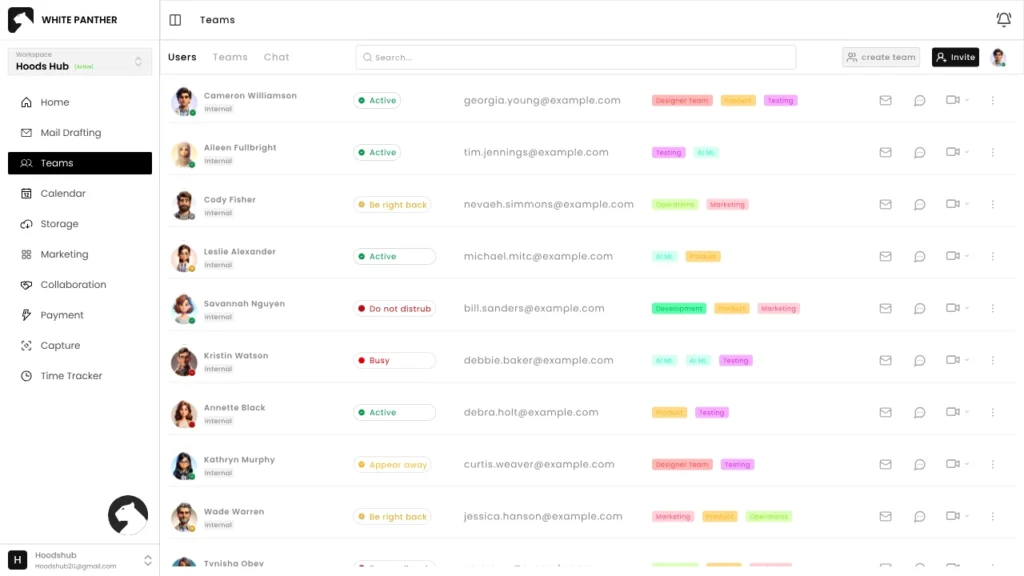
1. Centralized Workspace for Everything
Chat, meetings, tasks, notes, files, all in one secure dashboard.
No need to jump between Jira, Slack, and Drive. WhitePanther keeps your communication, documentation, and project tracking connected.
Benefit: Less tool fatigue, more focused collaboration.
2. Smarter Communication & Real-Time Sync
WhitePanther’s built-in chat and video tools ensure updates happen instantly.
You can tag teammates, assign follow-up tasks during calls, and sync notes, all without leaving the screen.
Benefit: No miscommunication, no lost context.
3. Integrated Cloud & Secure Access
With Google Drive and Dropbox integration, your team can upload or download files safely using OAuth login.
Plus, all data is encrypted and GDPR-compliant, ideal for teams handling sensitive tech documents.
Benefit: Keep everything secure and synced automatically.
4. Built-in AI for Daily IT Workflows
Whether it’s writing client updates, summarizing meetings, or generating internal reports, WhitePanther’s AI assistant saves hours daily.
Benefit: Automate repetitive communication and focus on core technical work.
5. Task Management & Time Tracking
WhitePanther links tasks, time logs, and client communication, so managers can see exactly where hours go, without micromanaging.
Benefit: Clear visibility into work without killing autonomy.
6. Collaboration Without Reloads
Switch from a chat to a task or a call instantly, everything runs in one continuous session.
Benefit: Smooth multitasking for teams that handle multiple projects or clients at once.
7. Built for IT Culture
Remote IT work needs structure, not strictness.
WhitePanther gives teams a sense of shared space with comment threads, milestones, and shared boards that make distributed work feel connected again.
Benefit: Stronger culture, less isolation, better teamwork.
Conclusion
Remote work isn’t going anywhere and for IT teams, it’s both an opportunity and a test. The same flexibility that makes remote work appealing also brings the toughest coordination, communication, and security issues.
But the fix isn’t more tools or stricter rules. It’s smarter systems, clear communication, and the right workspace to connect everything.
When IT leaders focus on structure, trust, and simplification, even the toughest remote work challenges turn into everyday strengths. Tools like WhitePanther make that shift easier, bringing projects, emails, calls, and collaboration together in one dashboard.
Because great remote teams don’t just work from anywhere, they work better from everywhere.
FAQs
1. What are the biggest remote work challenges for IT teams?
Some of the biggest remote work challenges are gaps in communication, tool overload, and slower issue resolution that directly impacts productivity of the entire team.
2. How can IT teams handle the challenges of working remotely effectively?
To overcome work from home challenges, team should centralize communication and improve documentation. Also bringing more transparency could help.
3. What are unnoticed work from home challenges for IT employees?
Issues like security risks, burnout and unclear work boundaries are among the most unnoticed work from home challenges that are productivity killer as well they bring risk to security of the organization.
4. How can IT managers maintain productivity in remote setups?
One of the most basic thing to do is by maintaining clear goals. Instead of just tracking hours, managers should track the outcomes.

SEO Content Marketer
I help IT, SaaS, and tech brands turn complex ideas into clear, conversion-focused content—blogs, landing pages, and campaigns that educate buyers, build trust, and drive qualified leads. I blend sharp storytelling with SEO and marketing strategy so every piece earns its place in the funnel.



