
Short Summary
This article explains what email productivity tools are, how they differ from regular email apps, and why they help reduce inbox overload. It reviews popular tools, compares their use cases, and shows how different working styles need different setups, including platforms like WhitePanther for managing email alongside other daily work.
TL;DR
- Email productivity tools help you manage conversations, follow-ups, and priorities instead of reacting to every new message
- They add structure to email through smart sorting, reminders, automation, and AI assistance
- Regular email apps focus on sending messages, while productivity tools focus on getting work done
- WhitePanther works for people who want to manage email along with tasks, meetings, files, and daily work in one place
- Gmail suits individuals and small teams who want a familiar inbox with basic organization and extensions
- Microsoft Outlook fits corporate and enterprise environments that rely on calendars, tasks, and shared workflows
- Superhuman is designed for power users who handle high email volume and care about speed
- Spark works well for small teams that need shared inboxes and internal collaboration
- Missive is useful for support, operations, and agency teams managing shared conversations
- SaneBox helps busy professionals reduce inbox noise without changing their existing email setup
Email is still the backbone of work communication. Sales conversations, client approvals, hiring, invoices, follow-ups, everything flows through it. Yet most people manage email the same way they did years ago. Open inbox. React. Forget. Repeat.
That’s where email productivity tools come in. They are built to help you manage volume, context, and follow-ups instead of constantly firefighting. This is not about inbox zero fantasies. It’s about handling email with less friction and more clarity.
If your inbox feels like a never-ending to-do list, you are not alone. The right tool can make a noticeable difference in how much time and mental energy email consumes.
In this article, we are going to discuss email productivity tools and why they matter in everyday work. We will look at what these tools actually solve, how they differ from regular email apps, and where they fit into modern workflows. We will also break down some of the most widely used email productivity tools, explaining what each one does well, where it struggles, and who it is best suited for.
Table of Contents
What is email productivity tool?
An email productivity tool helps you handle email without letting it take over your day. Instead of just showing messages, it helps you organize conversations, remember follow-ups, and focus on what actually matters. Many of these tools add reminders, smart sorting, or writing help so you spend less time in your inbox. The idea is simple: make email easier to manage and less mentally exhausting.
Why Use Email Productivity Tools?
Email becomes unmanageable when it tries to do too many jobs at once. It acts like communication, task management, reminders, documentation, and collaboration all rolled into one. An average professional receives 121 emails every day and basic email apps are not designed for that reality.
Email productivity tools help by adding structure where email lacks it.
They help you prioritize important conversations automatically instead of relying on manual sorting. They reduce the need to remember who to follow up with and when. They also cut down the time spent searching for past emails, attachments, or decisions.
Another big reason is context. Many tools connect email with tasks, calendars, or team workflows so messages are not floating around without ownership.
If email is central to your workday, using tools designed only for sending and receiving messages slows you down over time.
Email Productivity Tools vs Regular Email Tools
| Area | Regular Email Tools | Email Productivity Tools |
| Core function | Send and receive emails | Manage work through email |
| Organization | Folders and labels | Smart sorting and rules |
| Follow-ups | Manual tracking | Automated reminders |
| Task handling | External tools required | Built-in or connected workflows |
| AI assistance | Minimal | Drafting, summaries, prioritization |
| Collaboration | Limited | Shared inboxes and assignments |
| Time impact | Reactive | Designed for efficiency |
Regular tools help you communicate. Email productivity tools help you operate.
Top 7 Email Productivity Tools
| Sr. No. | Tool Name | Best For (ICP) | Best Use Cases |
| 1 | WhitePanther | Founders, startups, SMEs, remote teams | Managing email alongside tasks, meetings, files, and time tracking from one dashboard |
| 2 | Gmail | Individuals, freelancers, small teams | Everyday email communication with basic organization and integrations |
| 3 | Microsoft Outlook | Enterprises, corporate teams, operations-heavy roles | Email, calendar, and task coordination in structured work environments |
| 4 | Superhuman | Executives, sales leaders, power users | High-volume email handling with speed-focused workflows |
| 5 | Spark | Small teams, collaborative roles | Shared inboxes, team discussions, and email assignments |
| 6 | Missive | Customer support teams, ops teams, agencies | Managing shared inboxes with internal chat and clear ownership |
| 7 | SaneBox | Busy professionals, inbox-heavy roles | Reducing email noise and prioritizing important messages |
1. WhitePanther
WhitePanther approaches email as part of a larger work system rather than a standalone activity. Emails live alongside tasks, meetings, and notes in one interface. The goal is to keep context intact, so conversations are not isolated from the work they trigger. AI is used mainly to assist with drafting and organizing emails within that broader flow.
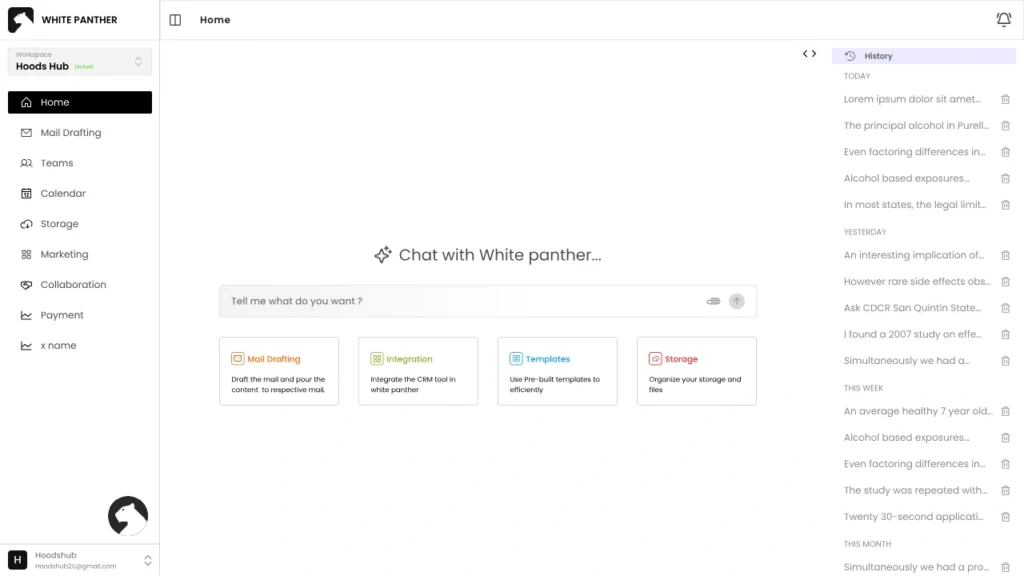
Key features
- AI-assisted email drafting
- Centralized inbox inside a workspace
- Smart categorization
- Unified view of work items
Pros
- Keeps email connected to actual work
- Reduces switching between tools
- Helpful for managing multiple responsibilities
Cons
- New product, so less user reviews
Other Features Offered by WhitePanther Beyond Email
- Meeting and calendar view for schedules and upcoming calls
- Internal team communication for quick discussions
- Time tracking to log and review work activity
- Screen recording for quick feedback sharing
- AI tools for content drafts, ideas, and summaries
- File and document access within the same workspace
- Central dashboard to manage multiple work functions in one place
2. Gmail
Gmail is often the starting point for most people. Its strength lies in reliability, speed, and a familiar interface. With proper filters and labels, it can handle high volumes reasonably well. However, most productivity gains come from how users configure it rather than from native workflow features.
Key features
- Advanced filtering and labels
- Strong spam detection
- Google Workspace integrations
- Smart reply suggestions
- Search across email history
Pros
- Easy to get started
- Stable and fast
- Huge ecosystem of add-ons
Cons
- Productivity depends heavily on setup
- Limited built-in task structure
- Can become overwhelming without discipline
3. Microsoft Outlook
Outlook is built for structured work environments. It blends email with calendars and tasks more tightly than many alternatives. For people working in organizations with shared schedules and formal processes, it provides a sense of order and predictability.
Key features
- Focused Inbox
- Calendar and task integration
- Shared mailboxes
- Rules and automation
- Enterprise security controls
Pros
- Strong for team coordination
- Excellent calendar handling
- Works well in corporate setups
- Clear separation of focused and other emails
Cons
- Interface can feel dense
- Slower for quick inbox clearing
- Overkill for lightweight use cases
4. Superhuman
Superhuman is designed for people who treat email as a core part of their job. Speed is the main selling point. Almost everything is keyboard-driven, and the app is optimized for fast triage rather than long reading sessions.
Key features
- Keyboard-first navigation
- Read status tracking
- AI-assisted reply suggestions
- Follow-up nudges
- Split inbox views
Pros
- Extremely fast workflow
- Minimal distractions
- Ideal for high-volume inboxes
Cons
- Premium pricing
- Limited outside email use
- Requires time to master shortcuts
5. Spark
Spark focuses on clarity and collaboration. It groups emails by importance and allows teams to work together on shared inboxes without endless CC chains. The experience feels lighter and more conversational compared to traditional clients.
Key features
- Smart Inbox grouping
- Team email assignments
- Internal comments on emails
- Shared drafts
- Snooze functionality
Pros
- Helpful for small teams
- Cleaner inbox experience
- Easy collaboration on conversations
Cons
- Limited customization for power users
- AI features are basic
- Some users have privacy concerns
6. Missive
Missive treats email as a shared responsibility. It combines inboxes with internal chat, making it easier for teams to coordinate responses without forwarding messages back and forth. It is commonly used in support and operations-heavy environments.
Key features
- Shared inboxes
- Internal chat on email threads
- Assignments and tags
- Automation rules
- Activity tracking
Pros
- Clear ownership of conversations
- Reduces internal email clutter
- Strong for customer-facing teams
Cons
- Less intuitive for solo users
- Interface takes time to adapt to
- AI support is limited
7. SaneBox
SaneBox works quietly in the background. Instead of replacing your inbox, it filters it. Low-priority emails are moved out of sight, leaving your main inbox focused on what matters most.
Key features
- AI-based email filtering
- Custom folders
- Snooze and reminder options
- Daily email digests
Pros
- Minimal behavior change required
- Works with existing email providers
- Effective at reducing noise
Cons
- No email writing assistance
- Not built for collaboration
- Subscription-based pricing
Conclusion
Email itself is not inefficient. Unstructured email is.
The role of email productivity tools is to bring order, visibility, and control to something most people manage reactively. Different tools solve different problems. Some focus on speed, others on collaboration, and some on reducing noise.
There is no single best choice for everyone. The right tool depends on how much email you handle, whether you work alone or in a team, and how tightly email connects to your daily tasks.
The important part is this. If email consistently drains your time and attention, using a basic inbox alone is rarely enough. A well-chosen tool can turn email from a distraction into a manageable system.
FAQs
1) What are email productivity tools and who actually needs them?
Email productivity tools help you organize, prioritize, and follow up on emails without relying on memory. If you handle client emails, sales conversations, or lots of internal threads daily, you will feel the difference fast.
2) Are email productivity tools worth paying for?
They are worth it when email is tied to revenue, deadlines, or client trust. If you save even 20 minutes a day and miss fewer follow-ups, the cost usually pays for itself.
3) Will these tools replace my current email like Gmail or Outlook?
Some tools replace your email client, while others sit on top of Gmail or Outlook and improve how your inbox behaves. The best choice depends on whether you want a new interface or just better organization.
4) Which features matter most when choosing an email productivity tool?
Start with smart sorting, reminders or follow-ups, fast search, and templates. If you work with a team, shared inboxes and assignment features matter more than fancy AI.
5) How do I pick the right email productivity tool without wasting time testing everything?
Look at your biggest inbox problem first. Too much noise? Pick filtering and prioritization. Missing follow-ups? Pick reminders. Team chaos? Pick shared inbox and assignments. Match the tool to the pain.

SEO Content Marketer
I help IT, SaaS, and tech brands turn complex ideas into clear, conversion-focused content—blogs, landing pages, and campaigns that educate buyers, build trust, and drive qualified leads. I blend sharp storytelling with SEO and marketing strategy so every piece earns its place in the funnel.



