
TL;DR
- Keep one email focused on one purpose
- Write subject lines that say what the email needs
- Open with context, then get to the point fast
- Make the next step obvious with deadlines when needed
- Use short paragraphs and bullets so it’s easy to scan
- Match tone to the person and situation (friendly, firm, formal)
- Cut filler and over-explaining, clarity beats “professional-sounding”
- WhitePanther AI helps draft and rewrite emails in different tones using simple prompts inside one unified dashboard
Let me start with a truth most people avoid.
Emails are not about writing.
They are about thinking clearly.
If your email feels messy, vague, or awkward, it’s usually because your thinking is messy. The inbox just exposes it.
Workplace emails decide more than people admit. They decide how competent you look, how fast things move, and whether people want to work with you again. And yet, most emails are either too long, too short, or completely missing the point.
Let’s break this down like humans, not like a corporate handbook.
First, Understand Why Most Work Emails Fail
Before fixing anything, you need to know what’s broken.
Most emails fail for one of these reasons:
- The reader doesn’t know why the email exists
- The action required is unclear
- The tone feels off for the situation
- The email assumes context the reader does not have
- The writer is trying to sound “professional” instead of clear
If you recognize yourself here, good. That means you can fix it.
Tips to Write Effective Emails at WorkPlace
One Email = One Purpose
This is where people mess up immediately.
If your email is doing three things at once, it’s doing none of them well.
Bad example:
“I just wanted to follow up on the meeting, share my thoughts on the proposal, ask about the timeline, and also loop in finance.”
This email is unfocused and annoying to read.
Better approach:
Decide the main purpose first. Everything else is secondary.
Good example:
“Hi Sarah,
This email is to confirm the final timeline for the proposal we discussed yesterday.”
Now the reader knows what this email is about in one sentence. That’s respect.
Write the Subject Line Like a Headline, Not a Label
Subject lines like “Update” or “Quick question” are lazy.
Your subject line should answer one question:
Why should I open this right now?
Bad subject lines:
- Update
- Meeting
- Follow-up
- Request
Better subject lines:
- Approval needed by Friday for Q3 budget
- Action required: Client feedback on proposal
- Clarifying next steps after Monday’s meeting
If the subject line is vague, the email gets ignored. Simple.
Start With Context, Not Small Talk
You are not writing a novel. You are also not texting a friend.
Skip fake politeness like:
“I hope this email finds you well.”
Everyone knows it’s filler. It adds nothing.
Instead, start with context.
Why are you writing this email right now?
Example:
“Following up on our discussion from yesterday’s product review meeting…”
That immediately anchors the reader. No confusion. No scrolling.
Get to the Point Faster Than You’re Comfortable With
Most people delay the point because they’re scared of being direct.
Stop that.
If you are asking for something, ask early.
Bad structure:
- Background
- Background
- More background
- Actual request hidden at the bottom
Good structure:
- Why you’re writing
- What you need
- Supporting details
Example:
“I’m writing to request approval for the revised campaign budget. The updated numbers reflect the changes discussed last week…”
The reader can act immediately. That’s the goal.
Make Actions Impossible to Miss
If the reader has to guess what to do next, your email failed.
Never assume “they’ll figure it out.”
Always be explicit.
Bad example:
“Let me know your thoughts.”
Thoughts about what? By when? In what format?
Better example:
“Please confirm by Thursday if we can proceed with Option B, or share any concerns we should address.”
Now the action is clear. The timeline is clear. No back-and-forth.
Short Paragraphs Win Every Time
Big blocks of text are intimidating. People skim emails. Accept it.
Use:
- Short paragraphs
- Line breaks
- Bullet points when listing items
Example:
“Here’s what we need to finalize:
- Final pricing approval
- Delivery timeline confirmation
- Assigned point of contact”
This is readable. This is usable.
Match the Tone to the Situation, Not Your Mood
Tone mistakes ruin good emails.
Your tone should depend on:
- Who you are writing to
- Your relationship with them
- The urgency of the message
- The seriousness of the topic
You don’t write to your manager the same way you write to a teammate. And you don’t write a deadline reminder the same way you write a thank-you note.
Example of tone mismatch:
“Hey buddy, just checking in again on the report.”
Sounds casual, but also passive-aggressive.
Better:
“Hi Alex,
Following up on the report due today. Please let me know if you need any clarification to close this.”
Firm. Polite. Clear.
Stop Over-Explaining to Sound Smart
Over-explaining is insecurity disguised as professionalism.
If a sentence does not help the reader act or understand, remove it.
Bad example:
“At this point in time, we are currently in the process of reviewing the aforementioned items.”
Better:
“We are reviewing the items now.”
Clear always beats clever.
Proofread for Clarity, Not Grammar Perfection
You don’t need perfect grammar. You need clarity.
Before sending, ask yourself:
- Would someone outside this project understand this email?
- Is there any sentence that could be misunderstood?
- Is the action obvious?
Read your email once like you’re busy and impatient. If anything slows you down, fix it.
Use Examples When Explaining Anything Complex
If you’re explaining a process, a change, or a decision, examples save time.
Example:
“Going forward, all client requests should be logged in the tracker. For example, if a client asks for a design revision over email, please add it to the tracker before responding.”
Now there’s no confusion.
Know When Email Is the Wrong Tool
This is important.
If your email:
- Is longer than five paragraphs
- Involves emotional topics
- Needs real-time discussion
Then email is probably the wrong choice.
Sometimes a quick call or meeting saves five emails. Smart communicators know when to switch.
End With Direction, Not Politeness
Don’t end emails with vague closings like:
“Looking forward to hearing from you.”
End with direction.
Example:
“Once approved, I’ll proceed with the vendor onboarding.”
This reassures the reader that things will move forward.
A Simple Email Framework You Can Reuse
If you want a repeatable structure, use this:
- Why I’m writing
- What I need or what changed
- Supporting details
- Clear next step
Most workplace emails fit this perfectly.
Where WhitePanther Comes In (And Why This Actually Matters)
Here’s the brutal truth.
Most people know what a good email should look like. They just don’t have the time or mental energy to write it every single time.
This is where WhitePanther earns its place.
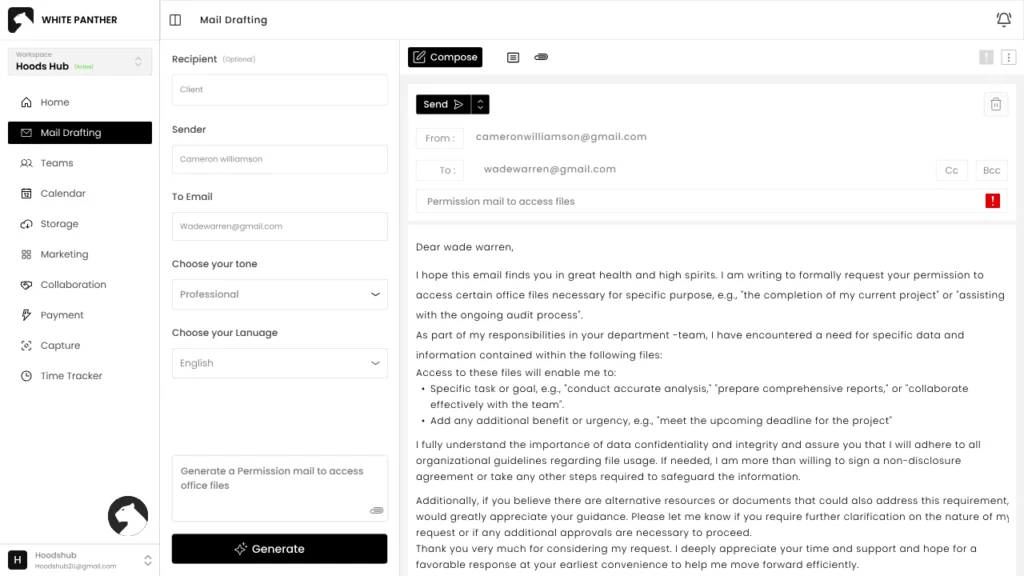
WhitePanther’s AI email assistant helps you write better emails inside your workflow, not in a separate tab, not in some disconnected tool.
You can:
- Draft emails using simple prompts
- Choose the tone based on the situation like professional, friendly, firm, or persuasive
- Rewrite unclear emails into crisp, readable versions
- Adjust language depending on who you’re writing to
For example, you can prompt:
“Write a polite but firm follow-up email asking for approval by tomorrow.”
Or:
“Rewrite this email to sound more confident and less apologetic.”
The AI doesn’t just generate text. It helps you think clearly and communicate better, faster, and with fewer mistakes.
And because WhitePanther keeps everything in one unified dashboard, your emails, tasks, context, and decisions stay connected. No switching tabs. No copying drafts around. Just focused communication that actually moves work forward.
If email is still your primary workplace communication tool, then writing better emails is not optional. It’s leverage.
And WhitePanther gives you that leverage without turning you into a robot.
Conclusion
Effective workplace emails are not about perfect wording or formal language. They are about clarity, intent, and respecting the reader’s time. When you know why you are writing, what action is needed, and communicate it simply, emails stop being a daily frustration and start becoming a tool that actually moves work forward.
FAQs
What makes a workplace email “effective”?
An effective workplace email is clear, specific, and action-focused. The reader should instantly understand why you’re emailing, what you need, and by when.
How long should a work email be?
As short as possible while still being complete. Aim for 5 to 12 lines for most emails, and use bullets when listing items or steps.
What’s the best structure for a professional email?
Use a simple flow: purpose in the first line, key details next, then a clear next step. If the reader can act without replying with questions, you wrote it right.
How do I sound professional without sounding robotic?
Skip filler lines, use plain language, and be direct but polite. Keep sentences short, avoid jargon, and match the tone to the person and situation.
How can WhitePanther help me write better emails?
WhitePanther’s AI helps you draft, rewrite, and refine emails using prompts and tone options like friendly, professional, firm, or persuasive, so you can send clearer emails faster inside one unified dashboard.




