
Finding the right team collaboration software can feel overwhelming. There are hundreds of apps promising to make teamwork easier—chat tools, file-sharing platforms, project boards, and all-in-one suites. But which one actually fits your business?
If your team is spread across emails, chats, and spreadsheets, you already know how messy things get. Collaboration software solves this by putting conversations, files, and tasks into one shared space. In this guide, we’ll walk through what it is, why it matters, and how to choose the best tool for your team in 2025.
TL;DR
Team collaboration software brings chat, files, tasks, and communication into one shared workspace. The right tool reduces app switching, improves visibility, and helps teams work faster—especially in remote and hybrid setups.
Table of Contents
What is Team Collaboration Software?
Team collaboration software is a digital platform that helps people work together more easily. Instead of juggling emails, chats, and spreadsheets across different apps, everything comes together in one place.
These tools allow teams to:
- Chat in real time
- Share files without losing them in inboxes
- Manage projects and deadlines
- Hold video or voice meetings
- Keep all updates in a single space
Think of it as your team’s online office. Whether your team works in the same building or across countries, collaboration software makes sure everyone stays connected, organized, and moving toward the same goal.
Why Collaboration Software Matters in 2026
Work doesn’t live inside one office anymore. Some teammates are in the office, some at home, and some maybe halfway across the world. Without the right tool, you get:
- Endless email threads nobody reads
- Missed updates because chats happen in five different places
- Lost files hidden in random folders
- Projects stalling because no one knows who’s doing what
The right collaboration software fixes that. It becomes your team’s “one-stop shop.” Everyone knows where to talk, where to share, and where to check progress. Instead of spending energy finding things, you spend it actually getting work done.
Importance of Team Collaboration Tools in Organizations
For organizations, collaboration tools aren’t just “nice to have.” They’re becoming essential. Here’s why:
- Boost productivity: Teams waste less time switching apps or chasing updates.
- Save costs: Instead of paying for multiple single-use tools, one good platform does it all.
- Stronger teamwork: Everyone sees the same updates, tasks, and files—reducing confusion.
- Happier employees: When communication is smooth, stress levels go down.
- Scalability: As your team grows, a solid tool keeps everyone aligned without chaos.
In short, collaboration tools help teams work together like one unit instead of scattered individuals.
Who Should Use Team Collaboration Software?
Team collaboration software is useful for:
- Remote and hybrid teams managing async work
- Small businesses replacing email-heavy workflows
- Growing teams struggling with task visibility
- Managers who want fewer meetings and clearer ownership
The Biggest Challenges Businesses Face with Collaboration Tools
Even with so many options, choosing a tool isn’t simple. Businesses often run into these problems:
Too many options, not enough clarity
You’ve probably seen it: one person suggests Slack, another pushes for Teams, and someone else swears by Trello. Before you know it, you’re using four tools and still not feeling organized.
Integration headaches
Ever had to copy the same update from Gmail to Asana, then paste it into Slack so nobody misses it? That’s a sign your tools don’t play well together. And when tools don’t talk to each other, your team ends up doing double the work.
Cost vs. real value
Some platforms look cheap… until you realize features are locked behind “premium” plans. Others cost a lot but offer bells and whistles you’ll never use. The real question is: does the tool actually save time and help the team work better?
5 Key Features to Look for in Workplace Team Collaboration Software
Not all tools are equal. But no matter what size your team is, these five features are must-haves:
- Chat & Messaging – Quick conversations without long email chains.
- File Sharing & Storage – So files don’t get lost in someone’s inbox.
- Video & Voice Calls – For meetings, brainstorming, or quick check-ins.
- Task & Project Management – Assign work, track progress, and hit deadlines.
- Integrations – Connects with your existing tools (like Gmail, Outlook, Zoom, or CRM systems).
If a tool doesn’t offer at least these, it probably won’t serve your team well in the long run.
How Team Collaboration Tools Help Internal Communication
Think about how many updates get lost in daily work. Without a clear system, important details hide in random chats, sticky notes, or personal to-do lists. Collaboration tools solve this by:
- Centralizing updates: Everyone sees the same announcements in one place.
- Reducing silos: Teams share info openly instead of working in isolated bubbles.
- Improving transparency: Managers can check progress without chasing people.
- Encouraging quick feedback: Instead of waiting days for an email reply, feedback can happen instantly in chat or comments.
The result? Fewer misunderstandings, faster decisions, and a team that feels more connected.
Common Team Collaboration Use Cases
Use Case 1: Remote Teams
Teams use shared chats, task boards, and async updates instead of constant meetings.
Use Case 2: Project-Based Work
Tasks, files, and discussions stay connected—no more searching across tools.
Use Case 3: Cross-Functional Teams
Marketing, sales, and operations collaborate without information silos.
A Simple Checklist for Choosing Collaboration Software
Before you hit that “Start Free Trial” button, run through this checklist. It’ll save you from shiny-tool regret later.
1. Define your team’s needs
Is your team 5 people or 50? Do you work mostly remote, hybrid, or all in-office? Smaller teams might prefer something lightweight. Bigger ones may need advanced features like permissions or compliance.
2. Prioritize must-have features
Don’t get distracted by extras. Ask:
- Do we need chat for quick questions?
- Do we want video meetings built in, or will Zoom do?
- Do we need file storage, or are Google Drive/Dropbox enough?
- Do we need task boards for projects?
3. Check integrations with your existing tools
If your business runs on Gmail, Outlook, Salesforce, or Zoom, make sure the new software connects with them.
4. Look at security & compliance
Even small businesses handle sensitive data. Ask if the tool has two-factor login, data encryption, and follows GDPR or ISO standards.
5. Think about the future
Today you might be 5 people. Next year you could be 25. Pick software that grows with you so you don’t have to switch tools every time you hire.
Choosing Collaboration Software by Team Size
Small Teams (1–10 people)
Look for simplicity, fast onboarding, and low cost.
Growing Teams (10–50 people)
Prioritize task management, permissions, and integrations.
Larger Teams (50+ people)
Focus on security, compliance, admin controls, and scalability.
Types of Collaboration Software (With Examples)
Not all collaboration tools are built the same. Here are the main “flavors”:
Communication-first platforms
These are chat-heavy tools made for quick conversations. Slack and Microsoft Teams are the big players here. Perfect if your team needs constant back-and-forth messages and video calls.
Project & task management tools
Think of Asana, Trello, or Monday.com. They’re built for organizing tasks, setting deadlines, and tracking progress. Great if your work revolves around projects.
All-in-one collaboration suites
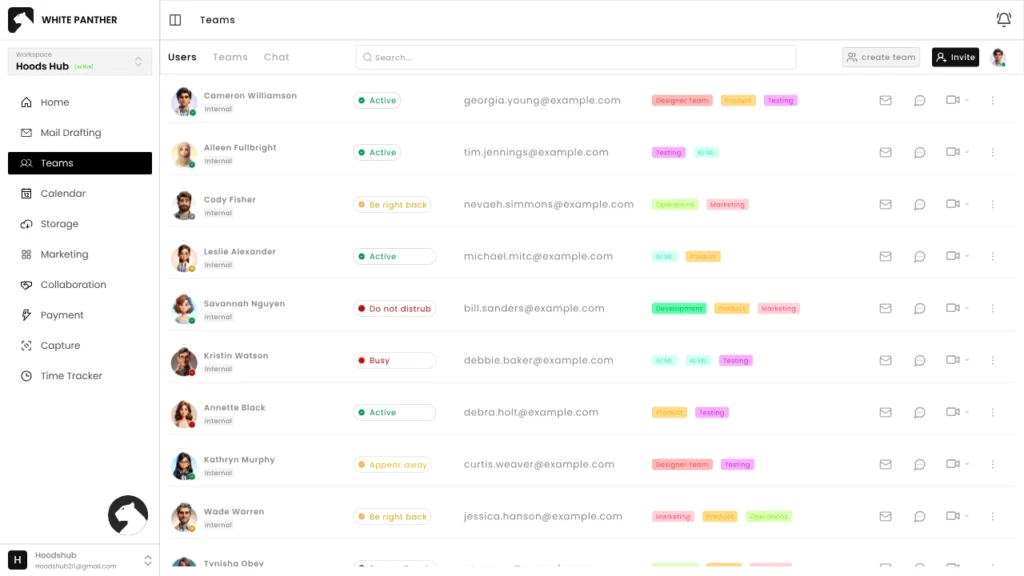
These combine chat, files, and tasks into one space. Examples: Google Workspace,Whitepanther or ClickUp. Handy if you want fewer logins and prefer one tool for everything.
Comparison Table: Top Collaboration Tools in 2025
| Tool | Best For | Key Features | Pricing (per user/month) | Works With |
|---|---|---|---|---|
| Slack | Real-time communication | Channels, chat, integrations | $7+ | Google, Zoom |
| Microsoft Teams | Larger orgs, MS 365 users | Chat, calls, file storage | Included in MS 365 | Office apps |
| Asana | Project tracking | Tasks, timelines, workflows | $10+ | Slack, GDrive |
| Trello | Simple visual planning | Kanban boards, checklists | Free+ | Power-Ups |
| ClickUp | All-in-one productivity | Chat, tasks, docs, goals | $7+ | 1,000+ apps |
| Google Workspace | Everyday work essentials | Gmail, Drive, Docs, Meet | $6+ | Native apps |
Common Mistakes to Avoid
- Picking a tool just because it’s “popular” on LinkedIn
- Going for the cheapest option without checking if it actually fits your workflow
- Ignoring how hard it will be for your team to learn the new tool
- Forgetting to test integrations before rolling it out
How to Successfully Roll Out Collaboration Software
Even the best tool fails without adoption. Start with a pilot team, set clear usage rules, and replace old habits gradually. Encourage leadership to use the tool daily so adoption happens naturally.
Future of Team Collaboration Software
Modern collaboration tools are increasingly adding AI features like smart summaries, task suggestions, and faster search across conversations and files.
In the future, collaboration platforms will focus less on activity tracking and more on outcome visibility.
Final Thoughts: Building a Connected Team
The truth is, no software will magically fix bad teamwork. But the right one makes working together much easier.
Start small—test one tool with a small group, gather feedback, and roll it out step by step. The best software isn’t the one with the longest feature list. It’s the one your team actually enjoys using every day.
👉 If you’re tired of juggling too many tools, maybe it’s time to try something built to bring everything together. Explore our team collaboration solutions and see how much simpler work can be.
What features should I look for in team collaboration software?
When choosing team collaboration software, consider essential features such as real-time messaging, file sharing, task management, and video conferencing capabilities. It’s also important to evaluate integration options with other tools your team uses, like calendars and project management software. Look for user-friendly interfaces and mobile compatibility to ensure your team can collaborate effectively from anywhere.
How do I assess the needs of my team before selecting software?
To assess your team’s needs, gather input from team members about their current collaboration challenges and preferences. Conduct surveys or hold discussions to identify the features they value most. Consider the size of your team and the types of projects you’ll be working on, as these factors can greatly influence the type of software that will best support your collaboration efforts.
Is pricing an important factor when choosing collaboration software?
Yes, pricing is a significant factor when choosing collaboration software. Many options range from free versions with limited features to premium versions with extensive capabilities. Evaluate your budget against the features you require, and consider long-term costs, including potential upgrades or additional user licenses. Finding the right balance between cost and functionality is crucial for making a smart investment.
Can team collaboration software improve productivity?
Yes, team collaboration software can enhance productivity by streamlining communication, reducing email overload, and enabling quick decision-making. By providing a centralized platform for sharing documents and updates, team members can collaborate more efficiently, thus minimizing downtime. Software that includes task tracking features can also help keep projects organized and on schedule.
What are some popular team collaboration software options?
Some popular team collaboration software options include Slack, Microsoft Teams, Asana, Trello, and Zoom. Each of these tools offers unique features tailored to different team needs. For example, Slack is renowned for its messaging capabilities, while Asana excels at task management. Research each option to determine which aligns best with your business requirements and team dynamics.
How can I ensure that my team adopts the new software?
To ensure successful adoption of new collaboration software, involve your team in the decision-making process from the outset. Provide training sessions to familiarize everyone with the new tool and encourage feedback to address any concerns. Promoting a culture of collaboration and demonstrating the value of the software will help motivate team members to embrace the change.




