
TL; DR
- Workflow productivity drops when teams work across too many disconnected tools and lose context between tasks, conversations, files, and meetings.
- Operational efficiency suffers when daily work depends on manual follow-ups, repeated updates, and people remembering every next step.
- One of the biggest problems is poor visibility, where teams cannot clearly see what is pending, blocked, urgent, or already completed.
- Context switching throughout the day reduces focus, slows decision-making, and makes even simple work feel heavier than it should.
- Improving productivity starts with simplifying workflows and removing steps, approvals, or handoffs that do not add real value.
- Connected tools make a major difference because they bring work, communication, scheduling, and files into one business operating dashboard.
- Platforms like WhitePanther help reduce tab switching and workflow friction by keeping essential business activities connected in one place.
- The goal is not to make teams work more, but to help them work with less confusion, less waste, and better flow.
Table of Contents
Let’s be honest. Most teams are not struggling because people are lazy or unskilled. They are struggling because work is scattered. A task starts in email, the update lands in chat, the file sits in cloud storage, the deadline lives in a calendar, and the follow-up gets buried somewhere else.
That problem is bigger than it looks. McKinsey found that knowledge workers spend half their time on interactions, while the average interaction worker spends 28 percent of the workweek on email and nearly 20 percent looking for internal information or the right colleague. HBR also notes that constant app switching has become a normal part of digital work, which adds friction before real execution even begins.
That is where workflow productivity and operational efficiency start breaking down. The issue is rarely the amount of work alone. It is the number of handoffs, app switches, repeated updates, and missing links between decisions and action.
Improving workflow productivity means making work easier to move, track, and finish. Operational efficiency means reducing the avoidable friction that slows the business down every day.
So, if your team is busy all day but still feels behind, this is the conversation you need to have.
Current Challenges with Teams Workflow Productivity and Operational Efficiency
1. Too many tools, not enough connection
This is one of the biggest reasons teams feel busy but stay slow.
A business might use one tool for email, another for meetings, another for task management, another for file sharing, and maybe two more for communication and tracking. On paper, it looks organized. In reality, it creates disconnected work.
Every time someone must jump from one tool to another, they lose time and mental focus. It may only take a few seconds to switch apps, but when that happens all day, across the whole team, it becomes a real productivity leak. People also start missing context because the full story of a task is scattered across platforms.
The problem is not that teams use digital tools. The problem is that the tools do not work together in a way that supports how work actually happens.
2. Lack of visibility across workflows
A lot of teams are working without clear visibility. Managers do not know what is blocked, employees do not know what is urgent, and departments do not know what another team is waiting for.
When there is no shared view of work, decisions get delayed. Follow-ups become manual. People spend time asking for updates instead of making progress. Even simple tasks begin to feel complicated because no one can quickly see what is happening and what needs attention.
This lack of visibility also creates stress. Teams feel like they are always reacting instead of moving with control.
3. Repetitive manual work keeps eating valuable time
There is still too much manual work inside most businesses. Copying information from one place to another. Sending the same updates again and again. Searching for files. Rewriting emails. Setting reminders manually. Tracking time in separate tools. Repeating status meetings just to understand what changed.
None of this work directly creates value. It only keeps the machine running.
The worst part is that manual work usually grows quietly. Teams get used to it. They stop questioning whether a process makes sense and just keep doing it because that is how things have always been done. Over time, that drains energy from the work that actually matters.
4. Context switching reduces focus and slows decision-making
Every interruption has a cost. When someone drafts an email, jumps into a meeting link, checks a task update, searches for a file, and then returns to the original task, the work itself becomes slower and harder.
HBR notes that inefficient meetings are the number one barrier to productivity for many employees, with 68 percent saying they do not have enough uninterrupted focus time during the workday. Research cited by HBR also suggests that up to one-third of meetings may be unnecessary. That is not just calendar waste. It is attention loss.
That is why even capable teams can end the day mentally drained without feeling that meaningful work actually moved.
5. Processes depend too much on people, not systems
If work only moves because someone remembers to follow up, remind others, forward a file, or schedule the next step, the business has a system problem.
Too many workflows still rely on memory, personal habits, or individual effort. That makes operations fragile. If one person is absent, overloaded, or leaves the company, the process starts falling apart.
Operational efficiency improves when workflows are designed to support people, not depend entirely on them. Businesses need systems that reduce reliance on memory and make work easier to continue without disruption.
How To Improve Workflow Productivity and Operational Efficiency?
1. Start by simplifying how work moves
Before adding new tools or new rules, step back and look at how work flows today.
Where does a task begin? Who touches it next? Where does information get lost? Which approvals slow everything down? What gets repeated more than once?
Most workflow problems become easier to solve when you see them clearly. Sometimes the answer is not a major rebuild. Sometimes it is removing one extra approval, reducing one unnecessary meeting, or creating one clearer handoff between teams.
The goal is not to make operations look impressive. The goal is to make them easier to follow. Simple workflows are easier to manage, easier to scale, and much easier for teams to stick with.
2. Use connected tools that work like a business operating dashboard
This is where businesses can make one of their biggest gains. Instead of forcing teams to work across scattered apps, they need connected tools that keep communication, tasks, files, calendar activity, and follow-up actions close together. Think less in terms of a software stack and more in terms of a business operating dashboard.
That shift is not just about convenience. McKinsey estimates that better internal collaboration and knowledge sharing can raise knowledge-worker productivity by 20 to 25 percent. Gartner also says teams redesigning workflows with AI are twice as likely to exceed revenue goals. The value comes from redesigning how work moves, not from adding another disconnected tool.
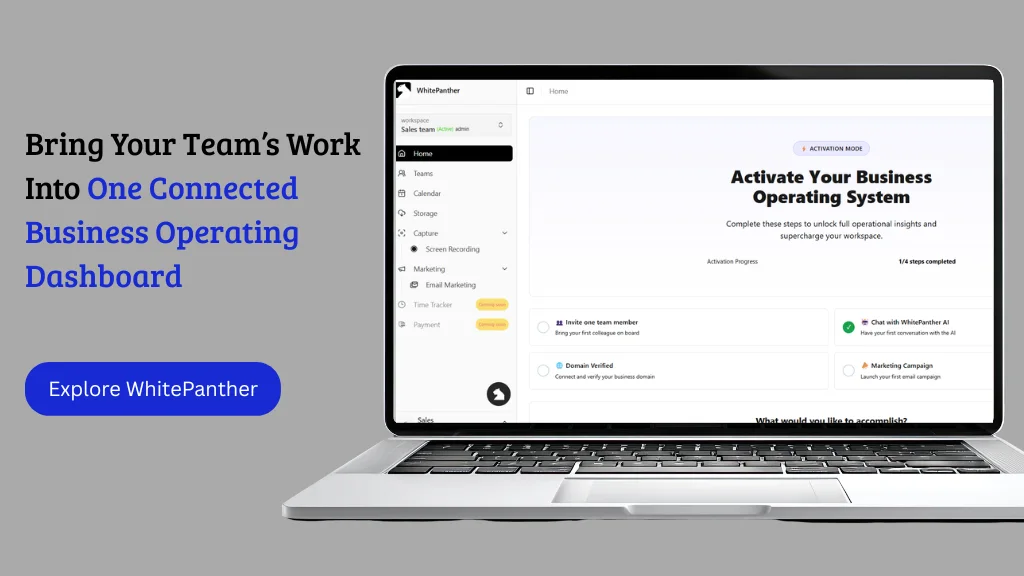
This is exactly why connected platforms like WhitePanther matter. WhitePanther is a business operating dashboard where teams manage critical work without constantly moving between tools and losing momentum. Instead of opening tab after tab to complete one workflow, the team can operate from a more unified setup where information, actions, and collaboration stay close together.
That kind of environment does more than save time. It reduces confusion, improves continuity, and helps people work with better clarity.
3. Reduce manual work with smarter automation
If a task happens repeatedly, it should be reviewed for automation.
That does not mean automating everything. It means identifying work that is predictable, repetitive, and low value. Things like reminders, meeting follow-ups, time logs, email drafting support, status updates, recurring task creation, and document routing can often be handled more intelligently.
Automation helps operational efficiency because it removes drag from the system. It also helps workflow productivity because employees spend less time on admin-heavy actions and more time on meaningful work.
The best use of automation is not replacing people. It is protecting their time.
4. Build better visibility into daily work
Teams move faster when they do not have to guess.
A good workflow should make it easy to see what is active, what is blocked, what is overdue, and what is waiting for review. This visibility should not depend on someone preparing a manual report every day. It should be part of how work is managed.
When teams can view progress clearly, meetings become shorter, follow-ups become easier, and decision-making becomes faster. Leaders can step in where needed instead of checking everything blindly. Employees can prioritize better because they know what actually matters now.
Visibility creates control. Control improves efficiency.
5. Keep communication tied to action
One common reason work slows down is because conversations happen far away from execution.
A team discusses a change in chat. The actual task sits somewhere else. The file is in another place. The meeting happens later. Then someone has to reconnect everything manually.
That gap creates delays and mistakes.
Businesses can improve workflow productivity by keeping communication closer to the work itself. When a conversation leads directly to a task, a calendar event, a note, a file share, or an action item, the workflow becomes tighter and more reliable. Teams waste less time translating talk into execution.
This is also why disconnected communication tools often become an operational burden. They hold discussions, but not movement.
6. Standardize what should not be reinvented every time
Not every workflow needs creativity. Some things should be standardized.
If your team keeps writing the same type of emails, repeating the same onboarding steps, following the same approval path, or recreating the same project structure, standardization can save serious time. Templates, repeatable workflows, shared guidelines, and predefined steps reduce decision fatigue and improve consistency.
Standardization does not make work robotic. It frees people from solving the same basic problems every day. Then they can use their energy on exceptions, decisions, and higher-value work.
That is one of the clearest paths to stronger operational efficiency.
7. Measure productivity in a way that reflects real work
A lot of businesses still measure productivity in shallow ways. Number of meetings. Number of messages. Number of hours online. None of these automatically tell you whether work is moving well.
A better approach is to look at how smooth work gets completed. How long does it take to move a task from start to finish? Where are the delays? How often do handoffs fail? How much rework is happening? How much time is spent just coordinating?
These questions reveal operational truths. They show whether your systems are helping or slowing the team.
Productivity should not be measured by visible activity alone. It should be measured by flow, completion, and clarity.
That is the practical value of connected operations. To make it more tangible, here are five simple workflows inside WhitePanther that reduce switching, improve follow-through, and keep context connected.
5 Workflows Inside WhitePanther That Can Improve Operational Efficiency and Team Collaboration
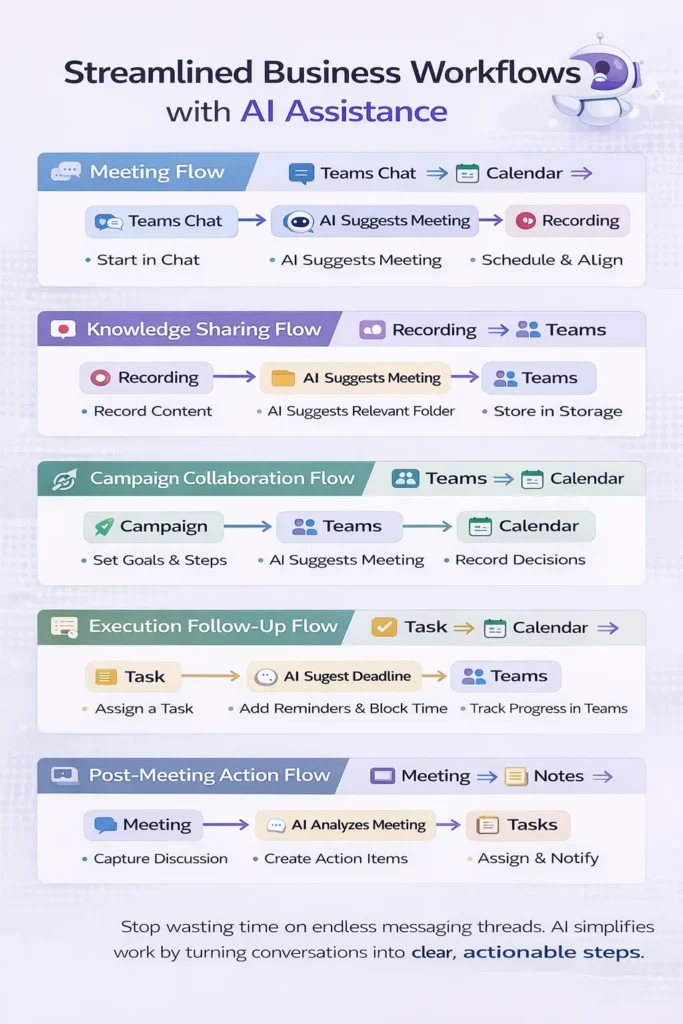
1. Teams Chat ↔ Calendar ↔ Recording
Meeting flow
This flow works when a discussion starts in chat but clearly needs live alignment.
Flow
Teams Chat:
→ “We need to align on this before moving ahead”
AI Suggests:
→ Schedule a meeting?
→ Add people from this thread?
User confirms
Calendar:
→ Create event
→ Add participants
→ Block time
Teams:
→ Auto-create meeting room
During Meeting:
→ Start recording
After Meeting:
→ AI generates notes
→ AI creates minutes of meeting
→ AI highlights decisions and next steps
Storage:
→ Save recording and notes
Teams:
→ Share summary back in chat
This is useful when teams are wasting time discussing the same thing in messages instead of resolving it once and capturing the outcome properly.
2. Recording ↔ Storage ↔ Teams
Knowledge sharing flow
This flow helps when someone needs to explain a process, walkthrough, update, or issue without repeating the same explanation multiple times.
Flow
User:
→ Record screen or voice explanation
Recording:
→ Capture workflow, update, or process
Storage:
→ Auto-save file in the relevant folder
AI Suggests:
→ Share with the team?
→ Add a short summary?
→ Tag this under a project or task?
Teams:
→ Post recording link in relevant chat or channel
Optional:
→ Attach to meeting record
→ Attach to campaign or project
This helps reduce repetitive explanations and turns one-time effort into reusable internal knowledge.
3. Campaign ↔ Teams ↔ Calendar
Collaboration flow
This is useful when Email Marketing campaign planning needs coordination across marketing, content, design, sales, or leadership.
Flow
Campaign Workspace:
→ Create or open campaign
Teams:
→ Discuss launch plan, dependencies, and blockers
AI Suggests:
→ Schedule review meeting?
→ Add milestone reminders?
Calendar:
→ Create launch review event
→ Add key stakeholders
→ Set deadlines and checkpoints
After Meeting:
→ AI summarizes campaign decisions
→ Save meeting notes inside campaign context
Teams:
→ Share decisions and action owners
This flow helps when campaigns are delayed not because of bad ideas, but because information is spread across too many disconnected tools.
4. Task ↔ Calendar ↔ Teams
Execution follow-up flow
A lot of operational inefficiencies happen after the meeting, not during the meeting. This flow is for making sure action actually moves.
Flow
Task Created:
→ “Send revised proposal by Thursday”
→ “Finalize onboarding workflow”
→ “Prepare client handoff checklist”
AI Suggests:
→ Add a deadline to the calendar?
→ Notify the owner in chat?
→ Set a reminder before the due date?
Calendar:
→ Block focused work slot
→ Add deadline alert
Teams:
→ Notify assignee
→ Share task update in team chat
If delayed:
→ AI prompts follow-up
→ Suggest rescheduling or reassigning
This works because it reduces the gap between assigning work and actually making space to complete it.
5. Meeting ↔ Notes ↔ Tasks
Post-meeting action flow
This flow is strong for founders and managers who are tired of meetings ending with “good discussion” and nothing else.
Flow
Meeting Happens
Recording or Live Notes:
→ Capture discussion
AI Analyzes Meeting:
→ Generate summary
→ Create minutes of meeting
→ Extract key decisions
→ Identify action items
Tasks:
→ Convert action items into tasks
→ Assign owners
→ Add deadlines
Teams:
→ Share action summary with everyone involved
Calendar:
→ Schedule follow-up if needed
This is useful because meetings should produce execution, not just memory.
Conclusion
Improving workflow productivity and operational efficiency is not about pushing people harder inside a broken system. It is about removing the friction that keeps simple work from moving cleanly.
When teams work across disconnected tools, low visibility, manual processes, and constant context switching, progress slows even when effort stays high. But when workflows are simplified and systems are connected, work becomes easier to track, easier to complete, and easier to scale.
That is why connected platforms like WhitePanther are becoming more relevant. They help teams keep communication, coordination, files, meetings, and follow-up work closer together in one business operating dashboard. For businesses that want fewer tabs, less workflow friction, and better day-to-day execution, that is the shift worth making.
FAQs
1. Why is my team busy all day but still falling behind?
This usually happens when work is stuck in too many places. Teams spend time switching between email, chat, meetings, files, and task tools instead of actually moving work forward. The issue is often not effort. It is poor workflow design, unclear priorities, and too much manual coordination.
2. How can I improve team productivity without micromanaging employees?
You improve productivity by fixing the system, not by watching people harder. Clear workflows, better visibility, fewer unnecessary approvals, and connected tools help teams work faster without constant follow-ups. When people have the right structure, they need less supervision and produce better results.
3. What are the biggest causes of low operational efficiency in a business?
Low operational efficiency usually comes from disconnected tools, repetitive manual work, poor communication between teams, unclear ownership, and lack of real-time visibility. These issues create delays, rework, and confusion, which slowly reduce output across the business.
4. How do connected tools help improve workflow productivity?
Connected tools keep tasks, conversations, files, meetings, and updates linked in one place. This reduces context switching and makes it easier for teams to move from discussion to action. A connected setup, such as a business operating dashboard like WhitePanther, helps teams manage work without constantly jumping between tabs.
5. What should I look for in a workflow productivity tool for my business?
Look for a tool that helps your teamwork from one connected environment instead of adding another layer of complexity. It should support collaboration, task tracking, communication, scheduling, file access, and workflow visibility in a way that feels natural to use. The goal is to reduce friction, not just add more software.

SEO Content Marketer
I help IT, SaaS, and tech brands turn complex ideas into clear, conversion-focused content—blogs, landing pages, and campaigns that educate buyers, build trust, and drive qualified leads. I blend sharp storytelling with SEO and marketing strategy so every piece earns its place in the funnel.



