Get Clearer Control Over Time, Work, and Approvals
WhitePanther’s built-in Time Tracker helps you record hours, review progress, and manage approvals from the same dashboard. With WhitePanther Orchestrator, time entries can connect back to Work Management, so logged effort becomes easier to review, approve, and act on.
Track time across tasks and active work
Use filters to understand workload, progress, and performance
Let Orchestrator surface time-related actions and approval needs
Stop chasing hours and start mastering them. Whether you are managing projects, tracking billable hours, or just trying to stay on top, WhitePanther’s time tracker keeps everything organized in one place, no more guessing or manual logs.
Get Clearer Work Visibility From Every Logged Hour
WhitePanther’s built-in Time Tracker helps professionals log hours while work is happening. Whether it is client delivery, internal execution, or task-based work, every logged hour becomes easier to review and understand from the dashboard.
Start and stop time tracking quickly
Track hours across projects and tasks
View active and completed time entries
Keep work hours connected to real execution
Time approvals become easier when submitted hours are visible in one place. Owners, founders, and managers can review logs, approve or reject entries, and keep project billing or internal reporting cleaner.
Review submitted time logs
Approve or reject entries quickly
Track pending and approved statuses
Reduce confusion around billable hours
Different work needs different visibility. WhitePanther helps you view time logs by day, week, month, project, task, or status, so you can understand where effort is going without digging through scattered records.
View daily, weekly, and monthly time logs
Filter by project, task, or status
Check logged hours with better clarity
Spot workload patterns faster
WhitePanther Orchestrator helps time tracking move beyond simple hour logging. When logged time needs review, approval, follow-up, or attention inside Work Management, Orchestrator can help surface the next action before delays build up.
Highlight time entries that need approval
Surface tasks with unusual time activity
Suggest follow-ups around delayed work
Connect logged effort with Work Management actions
Know Where Time Goes, So Work Moves with More Control
Stop losing track of time. With WhitePanther’s powerful time tracking and orchestrator capabilities, you will gain clarity, stay focused, and hit your deadlines consistently.
Protect Profit, Deadlines, and Accountability with Better Time Visibility
Use WhitePanther’s built-in Time Tracker to see where hours go, approve work faster, reduce billing confusion, and catch delivery risks before they become expensive.
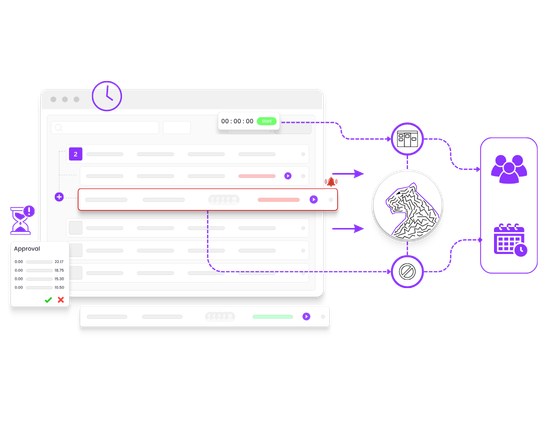
WhitePanther Orchestrator helps time tracking become useful beyond logged hours. It connects time activity with Work Management, Calendar, and Teams, so owners and managers can see risk earlier, review effort faster, and protect delivery before problems become expensive.
Time logged in Time Tracker → Work Management progress updates → Teams risk alert appears
When a professional logs time against a task, Orchestrator can reflect that effort inside Work Management. If the logged time goes beyond the expected effort, it can surface a risk alert in Teams, so the issue gets attention before the project burns more time or budget.
Deadline getting close → Logged effort shows slow progress → Calendar blocker meeting is suggested
When a critical task is near its deadline and the logged time shows weak progress, an Orchestrator can highlight the blocker and suggest a quick Calendar meeting. This helps owners act before the deadline slips.
Time entry submitted → Approval need is highlighted → Hours get reviewed faster
When time logs are submitted, Orchestrator can surface pending approvals for the right reviewer. This helps billing, payroll, and project reporting move without waiting for manual follow-ups.
Task taking longer than planned → Orchestrator flags overrun → Work Management gets attention
When one task keeps collecting more hours than expected, an Orchestrator can bring that work item back into focus. This helps managers check scope, quality issues, workload pressure, or unclear requirements earlier.
Professional starts the day → Orchestrator reviews time signals → Priority actions become visible
When you open WhitePanther, Orchestrator can surface time-related priorities such as pending approvals, delayed tasks, missing logs, and work items close to budget limits. This gives the day a cleaner starting point.
Missing time logs → Orchestrator reminds the right person → Records stay cleaner
When important work has no time logged, an Orchestrator can help highlight the gap. This keeps reporting more reliable and reduces confusion during billing, performance review, and delivery planning.
Log in to WhitePanther, open Time Tracker from the left sidebar, select the related project or task, and start tracking your work hours from the dashboard.
Yes. You can track time across multiple projects, tasks, and work items inside WhitePanther, making it easier to understand where work hours are being spent.
Submitted time logs can be reviewed by the admin or assigned reviewer. They can approve or reject entries, helping keep billing, payroll, and project reporting cleaner.
WhitePanther Orchestrator can surface time-related actions such as pending approvals, missing logs, delayed work, or tasks where logged hours are higher than expected.
Yes. Multiple users can track their work hours inside WhitePanther, while admins can review submitted logs, monitor progress, and manage approvals from one place.
Turn Timesheets into Early Warning Signals
Use WhitePanther’s built-in Time Tracker to catch slow-moving work, unclear effort, and pending approvals early, while Orchestrator helps surface what needs attention before reporting day arrives.